The Nano Controller introduces a familiar approach from Google Stadia.
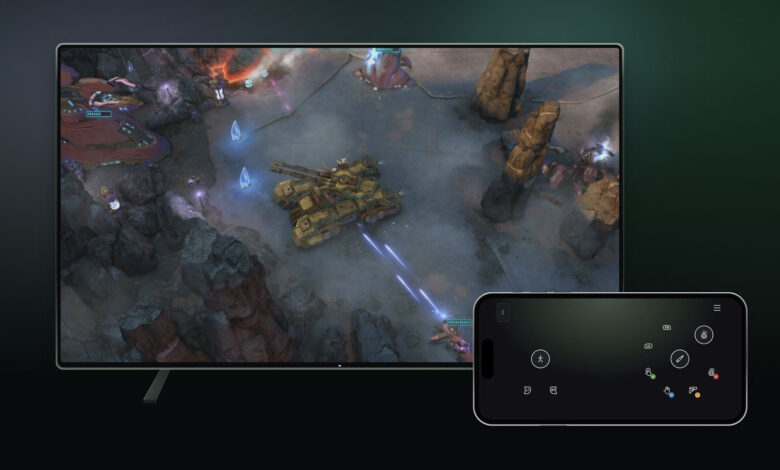
As new time limits for Xbox Cloud Gaming are set to take effect this month, Microsoft is offering users a chance to test two innovative controller options for the service. If you’re streaming Xbox games on a compatible smart TV, your smartphone can serve as a controller. The control layout appears in the browser, eliminating the need for a specific app download. Some titles come with tailored control schemes to enhance the experience.
This feature is currently available on select televisions. To activate it, navigate to Settings > Account in the Cloud Gaming interface on your TV and turn on Preview Features.
Other gaming streaming platforms, like Netflix, also allow the use of smartphones as controllers. While this setup may not be ideal for high-speed or intricate games, it can be handy for turn-based games if you don’t have a traditional controller at hand.
Additionally, players in the United States can link the new Nano Controller directly to Xbox Cloud Gaming through Wi-Fi, aiming to minimize latency.
Once you’ve configured the gamepad via the Xbox beta app on Android or the Xbox Accessories app on PC, you can follow the provided instructions to connect your Nano Controller to Wi-Fi. (Keep in mind that using the PC app requires enrollment in the Xbox Insider testing program to access Wi-Fi connectivity). Once set up, the gamepad will link via Wi-Fi when you log into Xbox Cloud Gaming using the same account.
This method is a clever attempt to cut down on input delay, though it’s important to note that this isn’t the first instance of a Wi-Fi-enabled controller. The gamepad for Google’s now-defunct Stadia cloud gaming service also supported this feature and allowed smartphones to function as controllers for TV gaming.
Microsoft indicates that both of these controller features are currently in preview, and there may be limitations regarding availability, supported devices, and games for the time being. For example, the Nano Controller’s Wi-Fi functionality is restricted to smart TVs and web platforms at this moment.