While I had previously heard of Linux Mint as a variant of Ubuntu, my experience mainly revolved around Ubuntu and Debian distributions. Recently, I decided to give Linux Mint a try, and I was quite impressed by its features.
Simple Installation Process
Smooth Installation Experience
The process of installing Linux has become far more approachable compared to earlier days, when extensive technical knowledge was often required. Live distributions like Knoppix were popular for testing purposes, and this trend continues, allowing users to evaluate operating systems before proceeding with installation. Linux Mint is in line with this tradition.
There are various versions of Linux Mint, and I chose the Xfce variant due to its lightweight nature, perfect for the virtual environment I was using. The installation followed standard procedures, such as user setup, keyboard layout selection, and partition management. These steps could be intimidating for newcomers, but the installation interface was designed thoughtfully, catering to both tech-savvy veterans and beginners.
With straightforward explanations, the program made the installation process accessible, even for those with minimal technical experience. Although having a knowledgeable friend could be helpful, Linux Mint significantly improved in hardware detection and disk setup, streamlining the experience for users.
Familiar and Intuitive Interface
A User-Friendly Desktop Environment
It’s important not to expect Linux to be a direct substitute for Windows; however, Linux Mint makes impressive strides in that direction.
While many distributions pride themselves on complexity or unique features, Linux Mint embraces familiarity. This makes it appealing to everyday computer users, mirroring the aesthetics and functionality of Windows, the leading desktop OS.
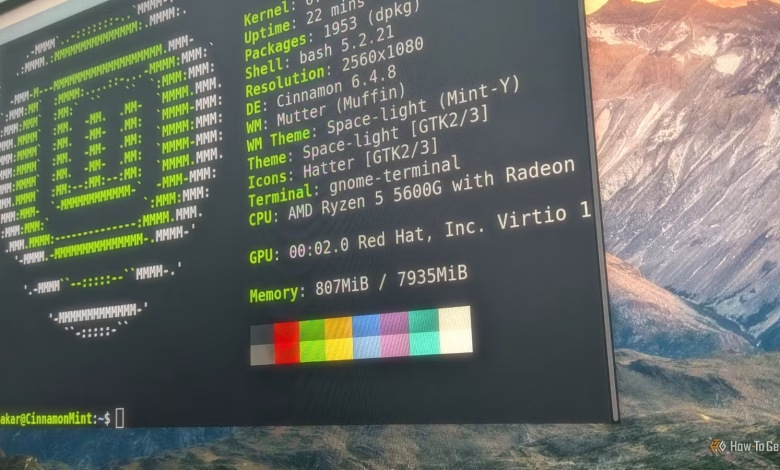
In the Xfce edition, changes have been made to create a recognizable experience for Windows users, including relocating the main panel to the bottom of the screen to resemble the Windows taskbar. As someone accustomed to Windows, I found it easy to start using the system immediately.
Instead of imposing specific user interface elements, Linux Mint seamlessly integrates into the background, allowing users to focus on their tasks. Essential applications like Firefox and LibreOffice come pre-installed, ensuring users have the tools they need. Though Chrome is popular, the interface of browsers has become standardized, making the transition easier for Chrome users. While LibreOffice has some differences from Microsoft Office, it remains largely compatible with most document formats.
The design of a Linux environment that users can easily overlook is quite an achievement.
Software Center Accessibility
Just a Click Away from Your Favorite Programs
Like other Linux desktop distributions, Linux Mint features a software center for users to acquire additional applications quickly. This is crucial since new users often seek familiar software from the start. Interestingly, the Software Center recommends popular proprietary applications. While some in the open-source community may view this with skepticism, many new Linux users might look for alternatives to Microsoft applications like Excel, which remains unavailable on Linux.
I was pleased to find popular applications, including Spotify, readily accessible. Although open-source enthusiasts often prefer software that adheres to open standards, many users require proprietary programs. Issues related to copyright play a larger role here, as they influence users’ software interactions. Ultimately, Linux Mint exemplifies the Linux philosophy of accommodating users and integrating with existing services.
Comprehensive Package Inclusion
Enjoy Multimedia with Pre-Installed Codecs
One of the aspects I appreciate about Linux Mint is its completeness as a working system. The ability to install multimedia codecs during setup distinguishes it from other distributions that focus solely on open-source software. This inclusion minimizes barriers, particularly for those who prioritize local media playback. Even in an era dominated by streaming services, the demand for proprietary codecs remains prevalent, showcasing why Linux Mint is favored as a desktop solution.
User-Friendly Update Process
You’ll Actually Want to Keep Your System Updated
While many users express dissatisfaction with Windows Update, Linux Mint offers an efficient way to manage system updates, which I highly recommend. Taking care of this aspect means one less concern for users. Right after installation, Linux Mint prompted me to update, which I appreciated.
I was surprised by the size of the installed packages; after updates, the total was around 15GB, consuming a significant portion of my allocated virtual drive space.
A Friendly Gateway for Windows Users Transitioning to Linux
If I were to restart my Linux journey today, Linux Mint would be a top contender for my first distribution. For those migrating from Windows, it offers guidance and a gentle introduction to Linux. Overall, my experience with Linux Mint was exceptionally pleasant.