While primarily recognized as a spreadsheet application, Excel’s capabilities extend far beyond simple calculations and tables. Its formulas and macros can facilitate a variety of applications, ranging from project management tools to interactive games and financial dashboards. This article explores three distinct types of programs that highlight Excel’s versatility before it might necessitate specialized software.
Project Management Systems
Excel Can Manage Schedules, Not Just Illustrate Them
A conventional Gantt chart in Excel often consists of a table populated with dates and colored cells, requiring manual adjustments whenever a task is delayed. In contrast, a scheduling engine allows users to automatically derive dates based on task dependencies. A basic version utilizes the WORKDAY function to calculate end dates from start dates and working days, automatically updating plans in response to early changes and maintaining parallel tasks with shared start dates.
On the more sophisticated end of the spectrum is ProjectEngine, an open-source Excel and VBA project compliant with the GPL-3.0 license. It accommodates various task relationships, including finish-to-start and start-to-start, as well as numerous predecessors and varying working calendars. This tool not only calculates the critical path and total float but also includes diagnostics to identify issues like dependency cycles, categorized by urgency. Users can interactively adjust task positions in the Gantt chart, enabling them to visualize changes across the schedule dynamically. Consequently, the reporting and dashboard functionalities reflect accurate, calculated data without inconsistency.
However, it’s not meant to replace comprehensive project management software like Microsoft Project or Primavera P6, which cater to larger organizational needs. It is designed for teams that primarily operate within Excel. Additionally, as a macro-enabled .xlsm workbook, users must enable macros for functionality. Nonetheless, this example underscores a compelling concept: with proper dependency management, working calendars, and structured calculations, a spreadsheet can function as effective planning software.
Interactive Games
Formulas Can Power Engaging Games
Excel can serve as a foundation for simple games, equipped with a grid that acts as a playing field, cells to track game states, and formulas to enforce rules. By formatting cells into square tiles, players can create a visually appealing game board. Users can apply conditional formatting and use formulas, such as COUNTIF to determine winning conditions or SUM to maintain scores, while a hidden sheet can store levels and high scores that persist when saving the workbook.
The involvement of VBA varies with the game type. Turn-based games like Minesweeper or Tic-Tac-Toe lend themselves well to Excel’s worksheet events, allowing macros to trigger on cell selections or changes, making rule enforcement straightforward. Conversely, real-time games, like Snake, require a game loop, which can be implemented using a timer routine like Application.OnTime, or through controlled iterations with DoEvents.
Macros can be assigned to keyboard shortcuts for movements, while functions like RANDBETWEEN or VBA’s Rnd can add randomness, essential for elements like spawning or shuffling.
Caring for performance and aesthetics is crucial. Disabling screen updating during redrawing can eliminate flicker, and manipulating data in bulk rather than cell-by-cell improves speed. However, the workbook needs to be saved as a macro-enabled .xlsm file, with macros permitted to execute, and Excel for the web does not support VBA. Although cell-based games may not rival commercial titles in appearance, a fun and operable game with varying levels can indeed be created, making it an interesting avenue to learn VBA.
Financial Management Tools
Integrating Market Data for Financial Dashboards
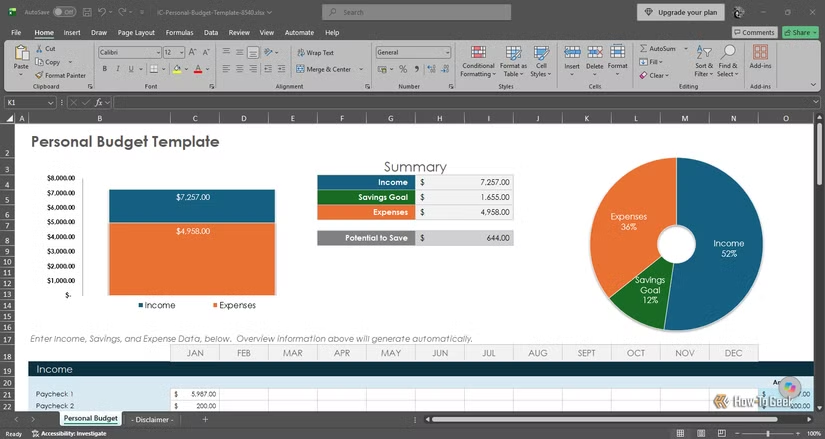
Credit: Arol Wright / How-To Geek
A personal finance tracker stands as an accessible project to create in Excel, requiring no macros for its basic functionality. One can easily set up a transaction log structured as an Excel table, where each row represents a transaction with columns for date, description, category, and amount. This table automatically expands with additional entries, ensuring all linked formulas and charts refresh accordingly. Consistent category entries can be maintained through a drop-down list created via data validation, preventing common errors such as typos that could fragment spending categories.
An additional sheet can transform the transaction log into a budget. By defining monthly limits for each category and using SUMIFS to tally relevant transactions, users can see remaining funds by subtracting totals from the set limits. Implementing conditional formatting can quickly highlight excessive spending. PivotTables can offer a quicker method for summarizing data, though refreshing is necessary after adding new transactions. Graphs detailing monthly expenses or category distributions can round out the financial dashboard.
The workbook can also be expanded further by importing bank statements in CSV format through Power Query, which can streamline records without manual input. Setting savings goals can involve calculating target amounts, while the PMT function assists in estimating loan payments, aiding in financial analysis. Ultimately, the challenges are more about discipline in data entry and maintaining organization rather than technical limitations. For simplicity, a financial tracker can effectively illustrate one’s monthly cash flow.
Excel as a Platform for Functional Software
Excel demonstrates its capacity to perform tasks typically assigned to specialized software through its project management tools, gaming capabilities, and financial trackers. Despite inherent limitations concerning speed and scale, these functionalities can thrive within the familiar environment of a workbook. For those interested in realizing the full potential of this platform, exploring any of these applications can be an enriching experience.