I Switched from Adobe Acrobat to a Self-Hosted Solution, and I’m Never Looking Back!

Adobe Acrobat is well-known for its comprehensive set of tools for handling PDFs, yet many users find the subscription costs for basic functions like editing, signing, and converting documents to be quite steep. Fortunately, alternatives such as BentoPDF can fulfill these needs without the recurring fees of subscription-based models.
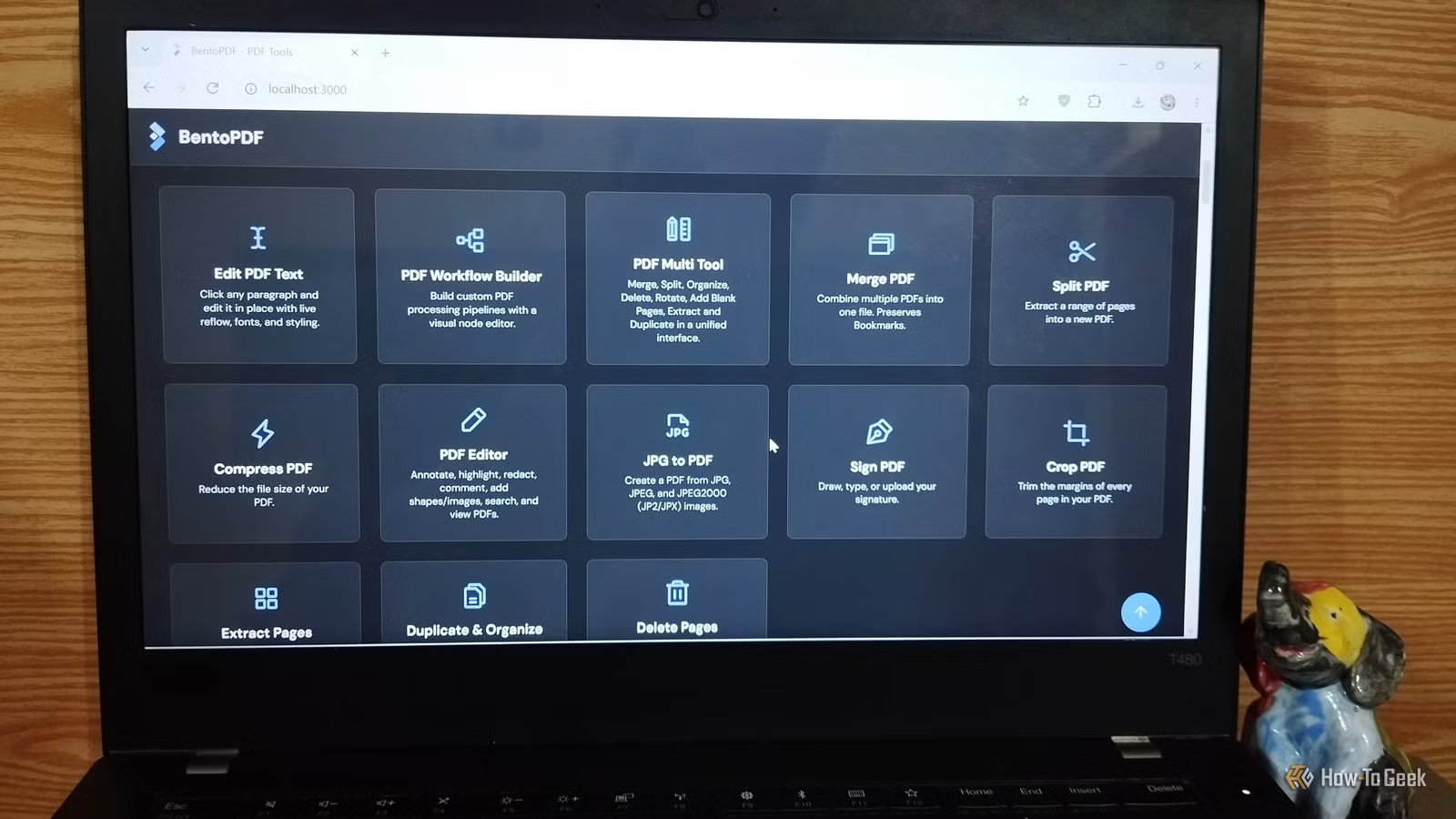
BentoPDF combines various PDF functionalities—including editing, annotations, signatures, conversions, and document management—all in one cohesive application. With its recent advancements in text-editing, it has become a formidable alternative to Adobe Acrobat. It is available for personal use at no cost, or you can purchase a lifetime commercial license for just $79.
BentoPDF Enhances PDF Text Editing
Modify Text Without Starting Over
One reason users remain loyal to Adobe Acrobat is its robust editing features. BentoPDF now includes a specialized tool for editing PDF text, allowing users to directly change text instead of just overlaying new text boxes. This feature enables quick fixes, such as correcting typos or updating sentences without the hassle of reconstructing the document entirely.
The dedicated Edit PDF Text tool is distinguished from BentoPDF’s PDF Editor, which is designed for markup and annotation. Together, these tools streamline the editing process.
Complete Suite for PDF Tasks
Add Comments, Fill Forms, and Sign Documents

Editing text is just one part of what needs to be accomplished with PDFs. In addition to this, users must review documents, provide feedback, fill out forms, and sign files. BentoPDF includes separate tools for these tasks, negating the need for multiple applications.
The PDF Editor provides functionality for highlighting text, adding comments, sketching shapes, and inserting images. For document signatures, a dedicated signing tool is available. You can even create fillable PDF forms or complete existing ones, making it ideal for various paperwork requirements.
All these features combined with text editing create a well-rounded experience within BentoPDF.
Integrated PDF Conversion
Transform Files Easily

Converting PDFs should not necessitate an additional application, and BentoPDF enables you to convert both documents and images into various formats seamlessly.
This tool allows you to switch PDFs into formats like Word documents and images while also converting supported documents and images into PDFs. This feature is especially useful when needing to edit a PDF in a word processor or consolidating images into a single document.
However, quality matters with conversions. Complex layouts, fonts, and tables may not accurately convert, so it’s advisable to check the output before distribution.
Effortless Document Management
Merge, Split, and Compress PDFs

BentoPDF is more than just an editing tool; it includes various page management capabilities that simplify the organization of PDFs without the need for additional software.
You can merge documents, split a PDF into smaller files, extract or delete individual pages, and even compress PDFs. Additionally, it offers enhancements like adding page numbers and watermarks, editing bookmarks, and managing tables of contents.
Having all these tools integrated makes the user experience convenient. Rather than searching for separate tools for tasks such as document merging or page removal, you only need to access BentoPDF.
Say Goodbye to Subscription Fees
Maintain Control Over Your Documents

The primary advantage of BentoPDF is not only its diverse features but also the self-hosting option via Docker, allowing you to use the toolkit without subscription fees. You can operate the application through your browser and manage your documents locally.
This self-hosted approach ensures control over where the application operates and who has access, although users must remember to secure their deployment, especially if it connects outside a local network.
While BentoPDF may not completely replace every advanced feature found in Adobe Acrobat, it covers about 90 to 95% of standard everyday PDF tasks. Users just need to take care of updates and maintenance on their own. For those looking to streamline their PDF needs without taking on extra subscriptions, it represents a great value.
Manage Your PDFs and Finances Together
Originating as a small internal tool in 2025, BentoPDF has evolved into a promising open-source PDF toolkit. Its rapid feature development positions it as a competitive option against Adobe Acrobat, appealing to many users. While it may not encompass every intricate feature, it effectively covers the majority of regular PDF requirements, making it a valuable tool for anyone aiming to keep PDF management both practical and cost-effective.