A Step-by-Step Guide to Installing Vela Maps: Your Top Alternative to Google Maps on Android

Andy Walker
In the vast landscape of Android applications, it’s not uncommon to find alternatives for just about every tool, especially when it comes to navigation. One app that has stood the test of time is Google Maps, an indispensable resource for commuters and explorers alike.
Google Maps has gained popularity thanks to its extensive features catering to various user needs. Its ability to combine navigation with user-generated content enhances the experience significantly. However, there’s room for alternatives, and Vela Maps might be one of them.
Are you open to using an open-source alternative to Google Maps like Vela?
107 votes
A new contender has emerged in the navigation arena: Vela Maps. This app utilizes OpenStreetMap as its core framework and integrates Google data to offer a substitute for users who prefer to avoid Google services.
Vela Maps: A Trustworthy Alternative
Vela Maps addresses specific challenges posed by Google Maps, particularly for those using de-Googled Android systems. These systems, like GrapheneOS, intentionally exclude Google Mobile Services, making traditional apps like Google Maps difficult to use.
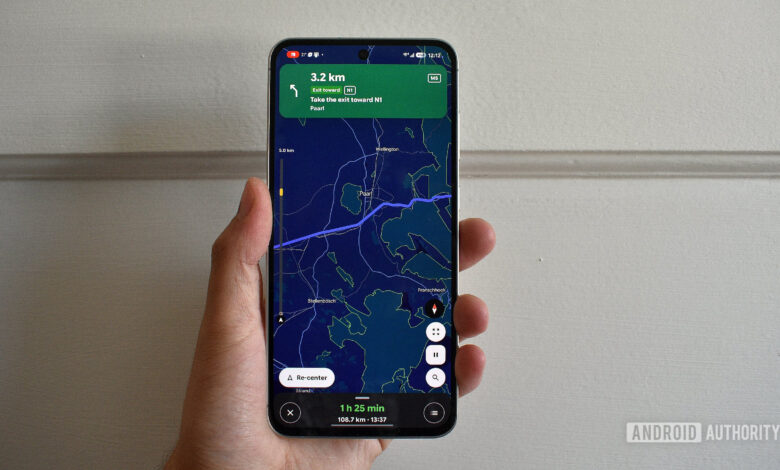
Vela Maps has been developed to support these alternative systems, providing a familiar interface similar to Google Maps, enhancing workflow for users who require navigation without reliance on Google.
Installing Vela Maps on Android
As an app designed to operate independently of Google, Vela Maps is not available in the Google Play Store. For installation, third-party app updater Obtainium is recommended as it allows users to access the latest APK versions directly.
To install Vela Maps using Obtainium:
- Access Obtainium’s repository to locate the latest release.
- Download the APK file from the Assets section.
- Install the downloaded file on your device.
- Add Vela Maps within the Obtainium app for easy updates.
You can also visit Vela Maps’ repository for a trial version if you prefer.
Functionality of Vela Maps
Vela Maps is not merely a stripped-down version of Google Maps; it is innovative in its approach, effectively combining OpenStreetMap data with additional Google resources when required. This allows it to serve as a competent navigation tool.
While it boasts a familiar interface for users accustomed to Google Maps, Vela Maps introduces unique features as well. For instance, the app enables offline map downloads for specific regions, catering to users in areas with poor network coverage.
Among its notable features is a vertical “Road Ahead” bar that provides real-time traffic updates and route information, enhancing the navigation experience significantly.
Limitations of Vela Maps
Despite its merits, Vela Maps is still a developing project and lacks full functionality across all features. Currently, it does not support Android Auto reliably, making it less suitable for in-car navigation without a phone holder.
Another gap in Vela Maps is the absence of community-generated content, such as the ability to review locations or report road conditions, which is a significant feature in Google Maps.
Is Vela Maps Right for You?
For users of alternative Android systems like GrapheneOS, Vela Maps offers a robust option, providing a similar look and feel to Google Maps while enhancing privacy. However, users who rely heavily on Google services may find it lacks the comprehensive experience offered by Google Maps.
Until Vela Maps matures and better integrates with systems such as Android Auto, it may not fully replace Google Maps in daily navigation tasks. However, it is a promising alternative worth considering for those seeking an open-source navigation solution.