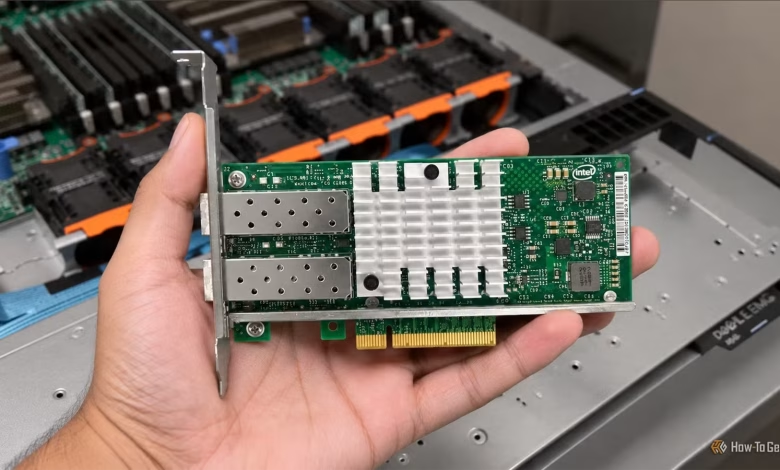
For the average user, Gigabit Ethernet typically meets all networking requirements. Even with a Network Attached Storage (NAS) device or a home server, gigabit speeds are often only fully utilized when transferring large files. For those seeking more speed, 10G Ethernet via traditional RJ45 connections offers around 1.25GBps. This bandwidth is generally sufficient for most home setups.
However, if even greater speeds are necessary, 25G network cards present a viable option. Priced under $100 per card, they can drastically enhance your home network speed or facilitate ultra-fast direct connections between devices. Nonetheless, there are some important considerations to keep in mind.
25G Network Interface Cards Have Limitations
Installation in Standard Desktop PCs is Possible
Sticking with RJ45 limits users to a maximum of 10Gbps, which is the highest achievable bandwidth with standard network interface cards (NICs) currently available. Although the IEEE 802.3bq standard introduced in 2016 allows 25G (25GBASE-T) and 40G (40GBASE-T) Ethernet over RJ45, practical applications of this technology remain scarce a decade later. Consequently, RJ45 is generally recognized as limited to 10Gbps.
In contrast, the SFP (Small Form-factor Pluggable) format, compatible with Direct Attach Copper (DAC) and fiber cables, supports speeds exceeding 10Gbps through a single connector. The first two generations, SFP and SFP+, cap out at 1Gbps and 10Gbps, respectively. However, the SFP28, as the third generation, offers speeds up to 25Gbps, making it the preferred port type for many 25G network cards.
A significant portion of 25G NICs available online is equipped with SFP28 ports and utilizes the Nvidia Mellanox ConnectX-4 Lx chipset. Despite being labeled as end-of-life, this chipset remains compatible with Linux and Windows 11, making it a favored choice among home users due to its affordability of under $100. These cards are designed for standard PCIe connections, enabling installation in any desktop PC, home server, or NAS with an available PCIe x4 slot.
Full 25G Speeds Require Compatible Equipment
Additional Considerations Exist
Achieving true 25G Ethernet speeds requires SFP28 ports on all connected devices. The drawback here is that 25G switches and routers are often prohibitively expensive for home users, making direct connections between devices—such as a home server and a desktop PC—a more practical approach.
You’ll also need DAC or Active Optical Cables (AOCs) that can handle 25Gbps. Keep in mind that passive DAC cables have a maximum range of about 5 meters, while longer AOCs can exceed $50.
These cards, designed primarily for enterprise environments, come with further stipulations. While many single-port models utilize PCIe x4, dual or multi-port cards often necessitate PCIe x8 or x16 slots, and some single-port cards may also require a x8 slot. The price can vary; older models may cost under $100, while newer options can easily be several hundred dollars.
Another point to consider is that these cards often require a cooling solution despite being equipped with heatsinks, as they can generate substantial heat, consuming approximately 14W under load. Designed for server racks with robust airflow, typical desktop and NAS cases may not provide adequate cooling.
Furthermore, many 25G NICs face challenges with Active State Power Management (ASPM), potentially hindering the CPU’s ability to enter deeper low-power states. This not only results in increased idle power consumption but may also contribute to additional heat generation.
Possible Applications for 25G Ethernet
Ideal for High-Performance Setups
Despite the challenges, a 25G network card can offer significant advantages for specific users. For instance, if you have an all-SSD NAS for transferring large files—such as games or for quick backups—25G enables file transfers at speeds of up to 3GBps, which more than doubles the capacity of 10G Ethernet.
Additionally, many 25G NICs support RDMA (Remote Direct Memory Access), alleviating the CPU from handling file transfers, thus freeing up resources for other tasks. However, utilizing SMB Direct for Windows file sharing through RDMA typically requires a high-end NAS or a Windows Server machine at the receiving end, and it is not supported on Windows 11 Home clients.
If you’re working with high-bitrate 4K or 8K video, you can access footage directly from the NAS as if it were on a local disk, eliminating the need to transfer it to your editing PC. Those using Proxmox clusters with Ceph running on NVMe drives can also benefit significantly, as 10G Ethernet may be a bottleneck in such setups. The increased speed of 25G Ethernet can facilitate faster VM live migrations since memory and disks may need to transfer data over the network.
10G Ethernet Remains Sufficient for Most Users
Ultimately, enhancing your PC and compatible devices with a 25G network card can upgrade your home setup—but only if you can take advantage of the extra bandwidth. While the initial investment may seem steep, the benefits can make it worthwhile for particular use cases.
For many users, however, Gigabit Ethernet continues to suffice, even if it poses some limitations within home networks. A NAS or a well-designed homelab can generally function efficiently with 10G Ethernet, whereas 25G Ethernet remains relatively rare in home environments and often lacks significant value to warrant the associated costs—especially when considering the need for a 25G switch rather than a straightforward connection.