Tired of Google Maps and Spotify? Explore These 4 Exciting Android Auto Alternatives!

Honestly, I’m finding Google Maps and Spotify rather monotonous. They’re the go-to apps on my phone and in my car, and I find myself stuck in a cycle of routine.
I open Maps, follow the navigation, switch to Spotify, skip through tracks, and repeat the same pattern daily. While both apps perform adequately, relying solely on them for everything becomes tiresome. In my vehicle, I often gravitate towards these standard selections.
This prompted me to explore alternative options. Numerous apps can assist with tracking fuel costs, navigating without internet access, and providing enhanced music control. Why settle for the norm when my car’s interface has the capability for more?
Here are four Android Auto applications that can enhance your driving experience.
Keep in mind that the compatibility and features of Android Auto may differ based on your phone, car, and location. Verify availability on Google Play for your device.
Fuelio
Keeping Tabs on Every Penny
I understand my spending when I refuel, but I rarely consider how those costs accumulate over time. This is where Fuelio proves beneficial. It monitors fuel transactions, mileage, fuel efficiency, and other car-related expenses, like servicing, parking, and insurance.
Instead of estimating daily driving costs, I can access my records for accurate insights.
For instance, before a weekend getaway, Fuelio’s integration with Android Auto allows me to view a simplified fill-up screen on my car’s display, alongside local fuel prices, mileage details, and trip logs. I can log refills directly without my phone, although I’ll still need it for managing expenses like parking.
While Fuelio can’t reduce fuel prices, it does provide clarity on my automotive expenses, which is a constructive first step.
Organic Maps
Offline Access Without Hassles
Picture this: I’m driving to a getaway outside the city and lose mobile data right when I need directions. Organic Maps alleviates that stress.
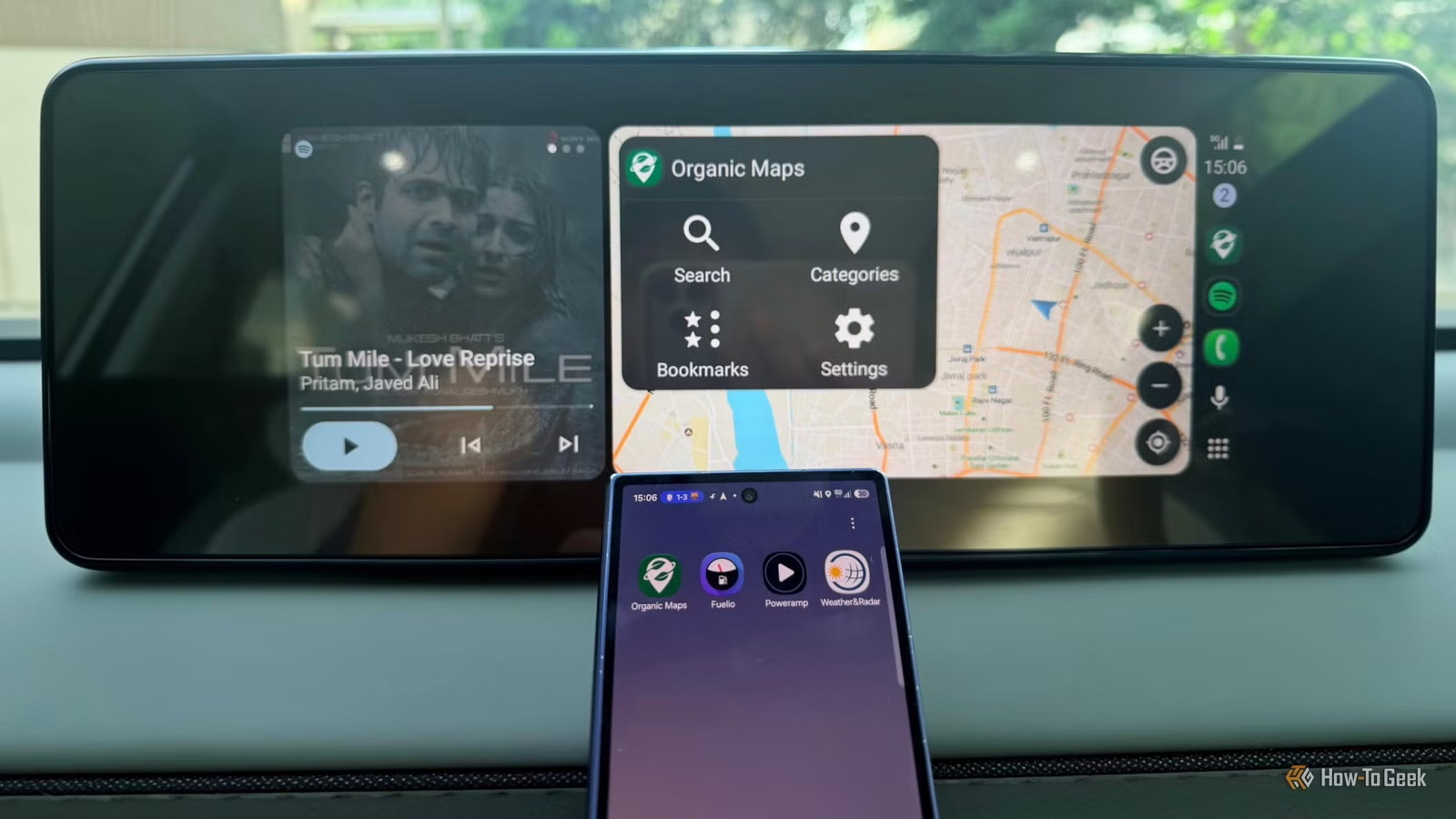
It lets me download maps beforehand, enabling searches and turn-by-turn voice guidance without internet access, making it an ideal pair with Android Auto.
But its benefits reach beyond offline navigation.
Organic Maps is free, open-source, and free of ads and trackers, meeting my need for a simpler, more private alternative to Google Maps. I can bookmark favorite spots, locate nearby cafes, and explore trails for hiking and biking. Its outdoor mapping details are especially useful when I’m exploring unknown areas on vacation.
While I appreciate Google Maps for real-time traffic updates, Organic Maps serves as a reliable backup for offline directions minus the excess.
Poweramp
Greater Musical Control
While I’m not ready to part with my music during drives, a break from Spotify is certainly welcome.
Poweramp is a fantastic alternative for those who prefer having their own music library over solely relying on streaming services. I can play tracks saved on my device, navigate my library by albums or folders, compile playlists, all without the fear of losing data mid-song.
What sets Poweramp apart is its audio customization. It features a robust equalizer, controls for bass and treble, and sound effects that let me adjust the sound quality. I can boost the bass on tracks I love or enhance vocals for clarity. The app also supports gapless playback, crossfading, replay gain, and lyrics, along with customizable themes.
Poweramp isn’t a substitute for Spotify if I’m on the lookout for new music or streaming options. However, when I wish to enjoy the songs I already possess while tailoring the audio experience, it’s a refreshing shift.
Weather & Radar
Monitoring Weather Conditions
There are countless instances when I head out under sunny skies only to find myself driving through unexpected downpours an hour later. This is particularly frustrating when venturing to new places without insight into how long the rain will last.
Weather & Radar equips me with forecasts and radar data before I leave, enhancing my travel planning.
The app works seamlessly with Android Auto, enabling me to access weather updates directly on my car’s display. Additionally, I can view detailed radar maps and forecasts on my phone, ensuring I’m prepared before hitting the road.
In my busy mornings, especially when getting my kid ready, I often overlook checking the weather. Having the ability to check it while driving is incredibly convenient.
A Fresh Driving Experience
While I don’t plan to uninstall Google Maps or Spotify anytime soon, it’s refreshing to have various alternatives for a change.
I may not use all four apps on every trip, but knowing they’re available makes my Android Auto experience much richer.
Occasionally, a few new applications are just what I need to break the daily cycle.