The Dependence of Apple’s HomeView on Your iPhone: Understanding the Connection

“There is no other product better suited to serve as your smart personal hub than the iPhone,” declared John Ternus, Apple’s newly appointed CEO, during his introductory remarks at the first iPhone event of the year. This suggests that the iPhone, which stores much of your personal information, is critical to the functioning of a separate smart device designed for home use.
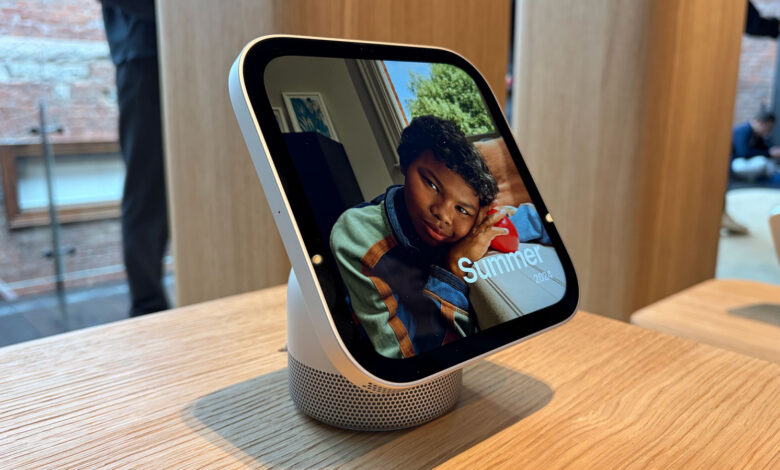
This week, Apple introduced the HomeView, a long-anticipated smart display unveiled last month. As detailed in my analysis, the HomeView combines multiple functionalities into one unit. It acts as a visual interface, a smart speaker constantly responsive to Siri commands, a central hub for various connected devices, a kitchen assistant, and a platform for FaceTime conversations with loved ones. Additionally, it serves as a digital photo frame.
However, the HomeView doesn’t utilize apps directly. Instead, it mirrors applications already on your iPhone or iPad to perform its functions. Rather than allowing users to download new applications from the App Store, the HomeView operates similarly to CarPlay, displaying the compatible apps that you have on your mobile device, along with essential Apple services such as Calendar, Messages, Reminders, and Weather.
This integration is why having an iPhone or iPad nearby is crucial for the HomeView’s functionality.
Cecilia Dantas, a member of the Apple Home product marketing team, shared, “When we design products for the home, we focus on three key principles: they must be intelligent, personal, and private.”
To ensure that Siri can provide personalized and meaningful responses, Apple needed a way to access the required data without compromising user privacy. By using your iPhone as the sole repository for this information, the system maintains security and accessibility, shielding your data from unauthorized access when you’re not home.
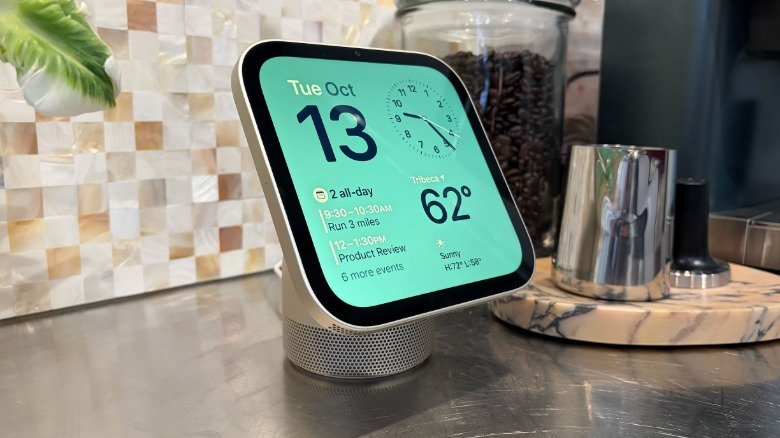
As a general hub for the home, the HomeView must cater to all household members, allowing them to control lighting or check who is at the door. However, it must protect your personal information, such as text messages and calendar notifications, ensuring that surprises remain intact. This focus on privacy is why the HomeView heavily depends on an iPhone or iPad, along with its built-in face and voice recognition capabilities.
VP of hardware engineering, Matthew Costello, mentioned, “Everything that feels intuitive on your phone is now available in a compact, glanceable device that provides information as needed. It recognizes you and displays your content, but disappears as soon as you walk away.”
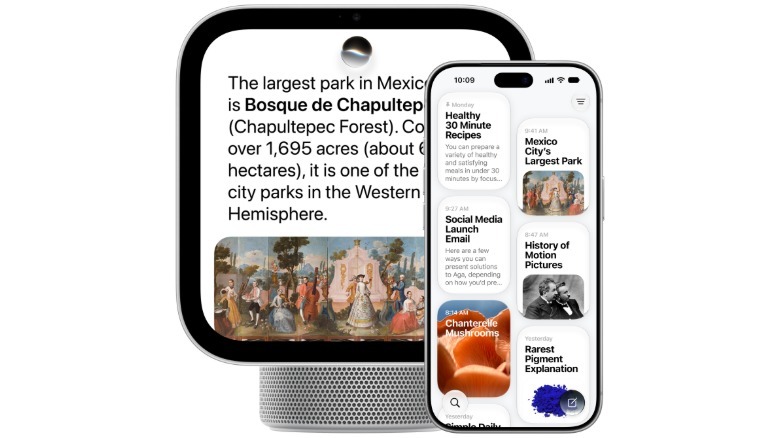
Costello further emphasized that the HomeView merges personal information with the convenience of a communal device. Since the iPhone serves as a hub for personal content and daily life, it naturally leads to “extending and connecting that intelligence” to devices like the HomeView.
If the HomeView fails to recognize a user, it restricts them to basic functions. Even recognized users will need to have their recently unlocked iPhone or iPad close by to access features like Messages or Calendar.
“Your personal content appears only after you’ve been recognized through face recognition and if your paired iPhone is nearby and recently unlocked,” Costello noted. “Our focus on context, intelligence, and privacy is crucial and distinctive.”
By linking the HomeView’s displays to your iPhone, your information becomes accessible as you interact with the device and vanishes when you step away. Costello explained that nothing is stored or displayed on the HomeView itself.
The reliance on an iPhone or iPad provides additional features. Like the HomePod, the HomeView enables the transfer of music, FaceTime calls, and more. One of its best capabilities is the recipe integration in Safari, enhancing the cooking experience. This feature also depends on the nearby Apple device to initiate the process, but Dantas assured that Apple views this relationship as beneficial rather than restrictive.
 Billy Steele for Engadget
Dantas remarked, “It’s not just about reliance; it forms a part of this ecosystem.” The similarities between the HomeView and your phone not only facilitate familiar applications but also provide a consistent interaction experience.
On the topic of interaction, the absence of buttons on the HomeView is noteworthy. Apple designed it this way intentionally. Initially, it seemed unusual since the device shares characteristics with an iPad (touchscreen), an Apple Watch (square design), and a HomePod (speaker), two of which feature physical buttons. However, Costello clarified that touch input was always meant to be a secondary option.
“We envisioned it as a voice-first device, with touch as a secondary function,” he explained. “This understanding shaped our design, leading to the omission of buttons and physical controls.”
Dantas highlighted that one of the main challenges during development was maintaining focus. Bringing a new product and associated software to market is inherently complex, requiring the engineering team to decide which features of existing devices and services to incorporate and which to discard.
“We have experience with home products, and we built upon that foundation,” she noted. “Determining what to include and what to leave out was a significant challenge, allowing us to create a powerful yet simple user experience.”