Say Goodbye to Dashboard Hopping: This Open-Source Tool Combines Your Pi-hole Interfaces!

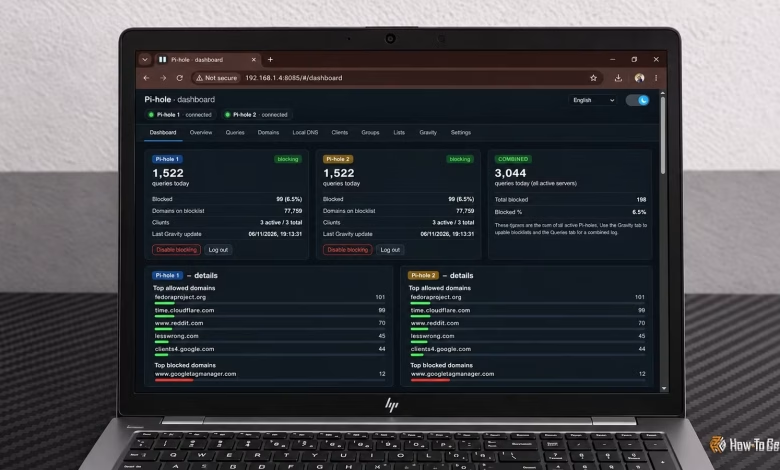
Operating Pi-hole within your network is an effective method to eliminate ads, trackers, and other unwanted domains across your devices. As you expand your DNS configuration, you may find it beneficial to run two Pi-hole instances. This setup not only provides a backup DNS server in case one fails but also requires you to manage two distinct installations.
To simplify the handling of multiple Pi-hole instances, I discovered Dobbelt-Pi-hole. This lightweight, open-source dashboard enables management of 2 to 4 Pi-hole instances from one interface. It comes with a host of useful features that streamline the upkeep of my DNS infrastructure.
Dobbelt-Pi-hole Consolidates Multiple Instances
A Unified Dashboard for Easy Management
Dobbelt-Pi-hole tackles a common issue: when managing numerous Pi-hole instances, each has its own web interface, necessitating constant switching. With Dobbelt-Pi-hole, you can control 2, 3, or 4 Pi-hole setups through a single, user-friendly dashboard. The tool connects to individual instances via their REST APIs, presenting aggregated information in one location.
Christian Kragh, the creator of Dobbelt-Pi-hole, approached the development with a practical mindset. It feels like a well-considered solution to a real challenge, rather than just another tech project. The dashboard is designed to be lightweight and efficient.
The entire interface exists in a single HTML file, with integrated CSS and JavaScript. Utilizing Chart.js for visualizations, it employs Nginx for proxying API requests to the linked Pi-hole instances. This design means there’s no backend application or Node.js environment to manage, showcasing a thoughtful development approach, especially in an age where many developers get sidetracked by the allure of emerging technologies.
Monitor DNS Activity from All Instances
Streamlined Monitoring with Combined Data
Instead of checking various statistics like query counts or blocked queries across multiple installations, Dobbelt-Pi-hole allows you to view information from all your instances simultaneously. The dashboard includes the same types of visual data as the official Pi-hole interface, providing insights into DNS activity over time, query levels, and blocked requests—all in one consolidated view. This organization makes it significantly easier to track patterns and detect anomalies across instances without manual back-and-forth.
It also features a unified query log that enables inspection of DNS requests from all instances, with filtering options by client or query type. This functionality is especially beneficial for troubleshooting when a device suddenly fails to resolve a domain, as you can assess its DNS activity from a centralized location.
Additionally, centralized domain management for allowed and blocked entries is included. If a domain was mistakenly blocked, you can rectify this issue right from the primary dashboard, avoiding the need to adjust settings on each Pi-hole instance individually. The client management system also allows visibility into named clients across interconnected installations, simplifying the identification of requests by individual devices without needing to repeatedly check their IP addresses.
Moreover, Dobbelt-Pi-hole supports adlist management and Gravity updates, which manage the subscribed blocklists for filtering. Initiating these updates from a central interface saves users from having to navigate to each Pi-hole’s administration page separately.
A key feature is support for Teleporter backup. This Pi-hole feature facilitates configuration exports and imports, making it easier to migrate or recover installations. Through Dobbelt-Pi-hole, downloads of backups from individual instances can be done seamlessly, allowing for efficient management of your DNS configuration without multiple logins.
Important Limitations of Dobbelt-Pi-hole
It’s crucial to note that Dobbelt-Pi-hole does not function as a DNS failover mechanism. It does not automatically synchronize configuration changes, provide failover capabilities, or turn multiple instances into a high-availability cluster. Each connected instance operates independently as a DNS server. You must configure your router, DHCP server, or devices accordingly to ensure they use the desired DNS addresses. If failover or a virtual IP is required, you will need a solution specifically designed for that purpose.
If you are already utilizing multiple Pi-hole instances in your homelab, Dobbelt-Pi-hole is worth exploring. It does not replace Pi-hole nor complicate your DNS architecture; rather, it offers a practical management interface for what would otherwise necessitate juggling multiple dashboards.