
For a long time, my interactions with Siri were limited to basic tasks like setting timers or alarms. However, with the release of iOS 27, I now frequently use Siri for more complex queries and to help me navigate on-screen information.
While Siri is a focal point of this update from Apple, there are numerous other enhancements that improve overall usability.
Siri
Since I began using iOS 27 on my primary device following the public beta launch, I’ve also tested it on a different device via the developer beta. I’ve been impressed with the revamped Siri, actively seeking out innovative ways to utilize it—this shift is perhaps Apple’s greatest success, as I, like many others, had almost given up hope on Siri prior to this update.
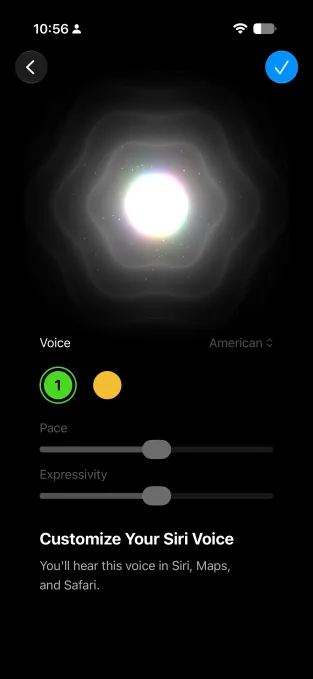
Over two years ago, Apple announced advancements in its AI capabilities, hinting at an improved version of Siri. After several delays, the company finally released it, and it has proven to be quite effective. Powered by Google’s Gemini models, this new Siri is significantly more intelligent than its predecessors, which relied on outdated knowledge and an unreliable integration with ChatGPT. Additionally, it features a new logo and animation.
Initially, I queried Siri about various sports topics, including World Cup matches, team rosters, and scores. Although I encountered minor issues in earlier developer versions, most of the information was accurate. Siri can now handle intricate, multi-step instructions—when I asked it to identify hidden features in iOS 27 and compile them into a note, it did so successfully.
Moreover, Siri can draft messages for you and send them to contacts.
Thanks to its ability to extract context from your files, messages, and emails, you can even ask Siri to reference a conversation, such as one about a delivery, and generate a return message.
Siri’s ability to work with on-screen context has been beneficial, allowing me to ask simple questions, like who the oldest player is while viewing World Cup lineups, or to read text aloud when I’m not in the mood to read myself. I could also ask Siri to look up funding details and competitors while browsing a startup’s website.
One of my favorite examples involved browsing coffee-related discussions online, where I asked Siri to add information about new roasters to a designated note. I did encounter some challenges in getting Siri to save the information correctly, but simplifying the note’s name helped improve consistency.
Notably, Siri now integrates with the Camera app, enabling questions about visible items in the viewfinder. For example, when at a restaurant, I asked Siri to identify the drink in my hand, and it accurately called it “green juice.” Upon mentioning that I was at an Indian restaurant, it correctly suggested it could be Jaljeera or Aam Panna, which turned out to be true. I even captured a picture of the restaurant’s sign and requested menu item recommendations from Siri.
You can also snap a photo of a coffee bag and inquire about the best brewing methods.

Under iOS 27, Siri AI now also has a dedicated app that allows you to revisit past interactions. In the settings, users can customize Siri’s voice and tone.
The updated assistant is designed to integrate seamlessly with third-party applications. As developers update their software in line with this new operating system, it will be interesting to see how effectively Siri interacts with other apps.
Apple Intelligence
Apple Intelligence drives numerous AI capabilities within iOS 27.
For example, the new system includes “vibe-coding” features. One of these is a Shortcuts creation tool that allows you to formulate shortcuts and automations using natural language. You can say things like “Show me today’s to-do items at 8 a.m.” or “convert photo to JPEG,” without needing to meticulously construct the shortcut. Once created, you can further refine it by adding steps, such as “convert selected photos to JPEG and share via AirDrop.”
I always wanted to keep track of songs I enjoyed in bars and cafés, so I created a shortcut that lets me Shazam a track and save both the song and the location.
Now, you can also set up custom alerts in Safari to monitor changes on a webpage, whether it’s for blog updates, pricing changes, or privacy policy revisions.
The Photos app has been enhanced with features like “reframe” and “extend.” While their performance can be inconsistent, these options occasionally improve image quality. The eraser function has also seen improvements, leaving fewer artifacts when objects are removed.


With Apple Intelligence, when you receive specific messages about events or locations, smart recommendations will prompt you to add them to your Calendar or Notes. Additionally, the Passwords feature can now automatically update passwords by logging into a website.
Other quality-of-life improvements
Before discussing more features, it’s worth mentioning the new clipboard functionality that I find extremely convenient. This feature allows copying and pasting of a variety of content—links, photos, videos, and text—effortlessly between apps. When something is copied, a shortcut appears on your keyboard, enabling easy pasting from different sources. I’ve relied on this feature frequently, and I cannot overstate how transformative it has been, even if it seems minor.

Furthermore, iOS 27 addresses user concerns regarding the aesthetic of Liquid Glass. Now, users can adjust its transparency according to their preferences, with fine control rather than just preset options.
A new feature facilitates intelligent network switching, which automatically transitions your connection from Wi-Fi to mobile data when Wi-Fi issues arise. This capability is seamless, ensuring no disruption in your internet connection during critical tasks.
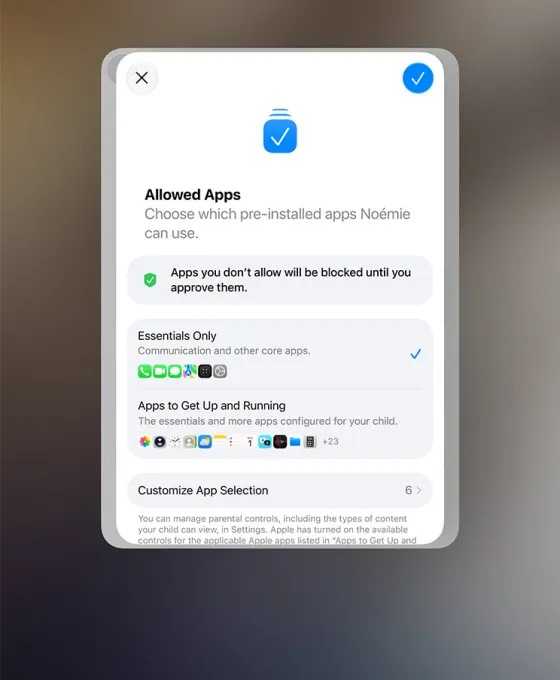
Child safety has also been a key focus of this update, which introduces a setup process recommending crucial apps. Parents can establish schedules, time limits, and allowances for various days, along with receiving notifications for new website access by their children, which they can approve remotely. Additionally, there are alerts when children encounter inappropriate content in Messages, FaceTime, and other apps.
In addition to Siri AI, iOS 27 may not boast standout features but enhances daily functionality significantly. Previously, I relied on external tools like ChatGPT or Gemini for answers. Now, with iOS 27, I’m finding myself turning to Siri more frequently, even though I don’t primarily use Apple’s Messages or Mail apps.
iOS 27 is now available for all users with iPhone 11 or later and iPhone SE (2nd generation) or newer. Users can navigate to Settings > General > Software Update to install the latest version.
When you make a purchase through links in our articles, we might earn a small commission, but this does not impact our editorial independence.