Having used Windows since its 95 version, I’ve witnessed many beloved applications fade away or be substituted with more “contemporary” options. Though these new alternatives may offer improvements, I find myself yearning for the original versions. I appreciated their design and user interfaces, and perhaps due to nostalgia, I believe they performed better and had fewer bugs than their updated versions. Consequently, I’ve been searching for applications that replicate that classic look and vibe, surprisingly even discovering them on Linux.
AbiWord
The New WordPad Alternative
With WordPad being one of the latest classic Windows programs to be retired, it seems logical to begin with it. Microsoft has removed WordPad from the Windows 11 version 24H2 rollout, directing users to Microsoft Word for rich-text document work or to Notepad for a basic, lightweight option. While Notepad has received enhancements to become a more functional Markdown-enabled note-taking tool, it doesn’t quite replace WordPad.
Offering only two choices at opposite ends of the functionality spectrum isn’t sufficient; a middle ground is essential. WordPad used to fill that niche: it was quick, lightweight, RTF-supporting, and completely free and offline.
Thankfully, Linux users can turn to AbiWord as an excellent substitute for WordPad. It mirrors WordPad in layout, is free to use, and handles RTF files efficiently. Plus, its lightweight nature allows it to launch much faster than fully equipped document editors like LibreOffice or ONLYOFFICE.
AbiWord includes all the functionalities you would expect in a document editor—rich-text formatting, word count, footnotes, tables, and revision tracking among others. By default, documents are saved in its .abw format but it also accommodates .doc and .docx files. However, some complex DOCX documents may not render perfectly, a known issue with LibreOffice as well.
AbiWord can be accessed as a Flatpak.
OpenShot
The New Windows Movie Maker
Windows Movie Maker, a staple that came with Windows XP, played a significant role in nurturing my interest in filmmaking and video editing. After returning from family trips, I would piece together the footage I shot over the weekend, trimming out the dull portions and incorporating entertaining transitions, culminating in a “movie” for everyone to enjoy. I hold many fond memories associated with Windows Movie Maker.
Sadly, Microsoft ultimately decided to discontinue it, replacing it with Clipchamp bundled in Windows 11, but it’s simply not the same. A major drawback is its freemium structure that pushes subscriptions, letting users export videos only up to 1080p in the free version, while 4K is reserved for paid subscribers. This is disappointing, especially when weighing alternatives that lean towards either professional-grade or ad-supported software.
While there are several good free alternatives for novice editors, including Kdenlive and Shotcut, I found OpenShot closest to replicating the balance of simplicity and functionality characteristic of Movie Maker. It boasts a familiar interface, supports unlimited tracks, and contains an extensive array of built-in audio and visual effects and transitions that are user-friendly.
OpenShot is also available as a Flatpak.
Space Cadet Pinball
The New 3D Pinball Game
Today’s PC games tend to captivate players, often consuming hours of their time. This immersive design can be counterproductive for professionals looking for a casual gaming experience. It’s during these moments that I often reminisce about the simple games of my childhood, particularly Space Cadet, the 3D pinball game included with Windows XP alongside classics like Minesweeper and Solitaire.
Space Cadet allowed for both leisurely play or marathon sessions to beat high scores; it was not demanding, making it ideal for short play. However, Microsoft eventually retired it post-Windows XP. For insight into that decision, a detailed article outlines this change.
Recently, while exploring Flathub, I stumbled upon Space Cadet Pinball, a reverse-engineered version of the classic game. Remarkably, it plays just like I recall, retaining the same table design and signature sound effects. Shockingly, it’s so true to the original that I first assumed it was a port for Linux.
Optimal Experience on a Windows-like Linux Distro
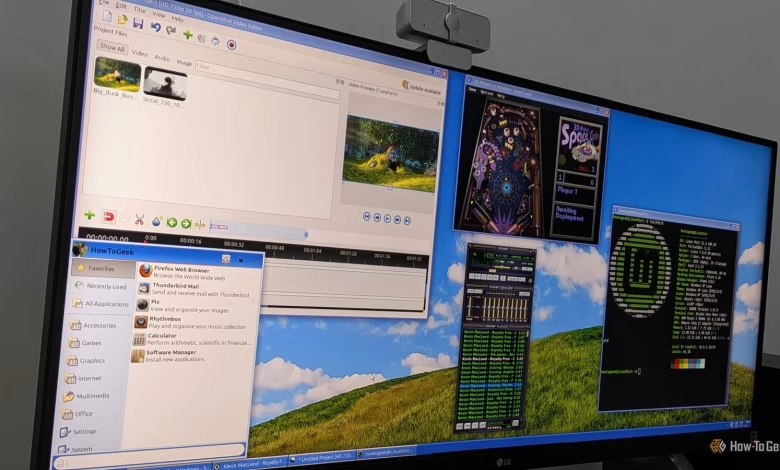
These three Linux applications successfully evoke the essence of cherished Windows programs, but if you desire your entire Linux interface to resemble Windows, consider starting with a Linux distribution that mimics that aesthetic. Utilize customizable desktop environments such as KDE Plasma, Cinnamon, or Xfce. For reference, I currently operate on Linux Mint Xfce Edition, complete with a custom Windows XP theme for all my screenshots.