Typically, web content resides in a browser, where users navigate pages, view images, and download files one at a time. However, for Linux users, HTTPDirFS presents an alternative approach by allowing HTTP servers to be mounted as a filesystem using FUSE technology. This enables users to explore resources as if they were local files within a file manager.
Recently, I experimented with HTTPDirFS on a website showcasing various book listings, cover images, and categories. Here’s how I set it up and what I discovered:
Getting Started with HTTPDirFS
Why Choose HTTPDirFS?
While HTTPDirFS is not meant to replace tools like wget or curl, it offers distinct advantages for accessing specific remote files without needing to download entire directories. My background in building scraping tools has shown me the potential of mounting a website as a filesystem, especially when browsing shared directories on platforms like Reddit’s r/OpenDirectories. This method allows users to access mountains of files—images, documents, and videos—efficiently.
Instead of downloading everything to find a few specific files, one can mount a remote directory using HTTPDirFS, mimicking local file access and retrieving only what’s necessary. This is particularly useful when dealing with HTML pages linking to various external media or documents—HTTPDirFS simplifies the process by presenting resources in a familiar filesystem format.
For my testing, I used a development version of HTTPDirFS since the packaged version did not include the website mode feature I wanted. Initially, I installed the necessary build tools and libraries:
sudo apt update
sudo apt install git build-essential meson ninja-build \
libfuse3-dev libcurl4-openssl-dev libgumbo-dev
After installation, the next steps involve checking for dependencies as they might vary across different repository versions. To get started, I cloned the HTTPDirFS repository:
git clone https://github.com/fangfufu/httpdirfs.git
cd httpdirfs
Next, configure and compile the application:
meson setup build
meson compile -C build
The compiled executable can be found at build/httpdirfs. It’s a good idea to check its version and available options before proceeding:
./build/httpdirfs --version
./build/httpdirfs --help
After compiling, I found my development build showed HTTPDirFS version 1.3.3. For this experiment, the crucial option was --website-mode, which allows for the presentation of resources with a text/html content type as directories, making linked media and assets accessible through the filesystem. Remember, website mode is off by default, so you must enable it manually.
How to Mount a Website Using HTTPDirFS
Enabling Website Mode and Exploring Resources
I selected “Books to Scrape” as my testing website since it contains useful resources like book titles, category links, and cover images, making it ideal for assessing HTTPDirFS functionality.
Initially, I created a specific mount point in my home directory:
mkdir -p "$HOME/HTG-Test"
I then launched the development executable with website mode enabled:
./build/httpdirfs --website-mode -f \
https://books.toscrape.com/ "$HOME/HTG-Test"
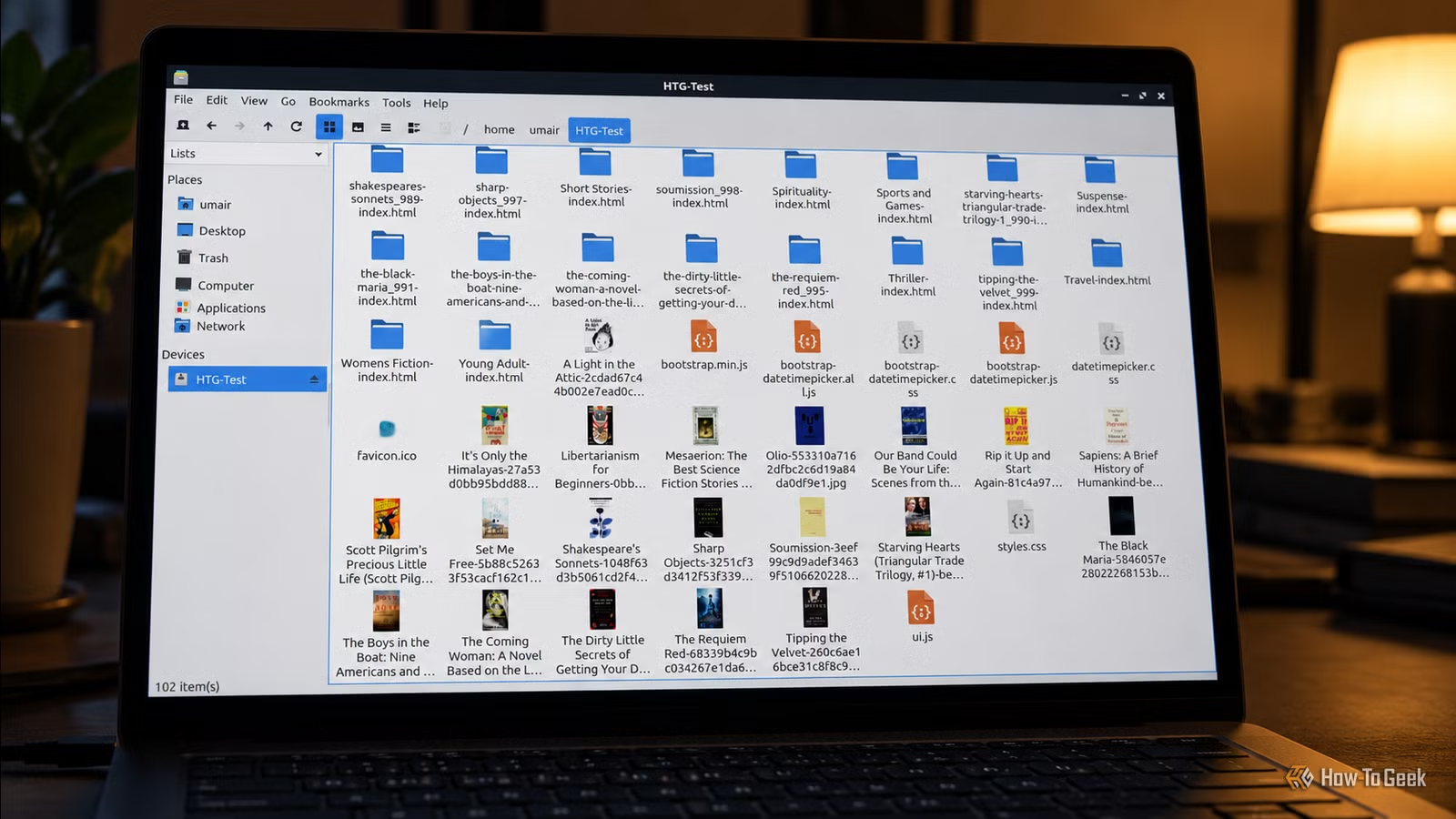
The -f option runs HTTPDirFS in the foreground, allowing me to see terminal output as I test. Upon processing the initial page, I opened the HTG-Test mount point in my file manager. The mounted filesystem revealed HTML pages for book categories and listings, along with cover images and other assets tracked by the site. Some HTML pages appeared as directories, letting me browse related resources easily.
I was able to navigate through genres, check individual book listings, and view cover pictures without carrying out a full website download. This convenience illustrates HTTPDirFS’s primary advantage: enabling applications to interact with the remote resources as though they were local files.
The efficiency of this system, of course, depends on the specific website structure and resources discovered by HTTPDirFS. For example, sites that require JavaScript for content loading may not display everything accessible via a standard web browser. While token authentication could be an option for accessing secure resources, HTTPDirFS does not function as a full web browser engine, and its results will be influenced by how HTML is structured and the resources referenced within each page.
Accessing Remote Files Without Full Downloads
While specialized scraping tools are better suited for structured data extraction and handling complex site architectures, tools like wget and HTTrack are ideal for creating offline mirrors of websites. HTTPDirFS fulfills a more specialized function by making discovered remote resources accessible through familiar filesystem paths.
This tool is particularly advantageous for those who frequently browse public file listings or seek specific images and documents from remote sites. Additionally, it offers an accessible platform for experimenting with FUSE and developing workflows that utilize familiar Linux tools for remote content management.