I Struggled with My Overheating DIY Server for Months — Here’s the Outrageous Solution That Finally Worked!

High summer temperatures can be challenging for tech equipment, and my home server is no different. Like many enthusiasts, I operate mine continuously, and while Ubuntu Server has been running smoothly, the hardware couldn’t keep up with the increasing heat. Fortunately, I discovered a surprisingly simple fix.
Transforming an Old Laptop into a Home Server
A Design Built for Heat Challenges
Many hobbyists begin their journey with repurposed machines, such as an outdated desktop, mini PC, or as in my situation, an old laptop with a non-functioning screen. After it gathered dust for years, I decided to convert it into a server.
Though a laptop does not compare to dedicated server hardware designed for long-term operation, it should still manage a moderate workload. I primarily use it for file storage and running a few applications, without gaming servers. However, as I began expanding the services on my setup, the workload increased, leading to more heat generation.
This typically wouldn’t pose a significant issue for laptops, as they have cooling systems to handle extended usage. Yet, my laptop, equipped with a dual-core i5-7200U processor with a 15W TDP, has a design flaw; as a 2-in-1 device, all the components are packed into the screen, limiting its cooling capacity.
I’ve frequently taken it apart and noted the small blower fan and flat heatsinks that offer minimal efficiency. While I upgraded the thermal pads and applied premium thermal paste, the temperatures continued to rise unchecked due to insufficient heatsink capacity to cope with the consistent heat production from my applications.
Struggling with the Heat
Performance Deteriorated with Rising Temperatures
I set up this laptop as a home server during the colder months and increased my workload as I became more adept at self-hosting. However, with the onset of summer and without air conditioning in my apartment, the temperatures in my kitchen surged, exacerbated by heat from appliances and direct sunlight.
The ongoing laptop usage at surrounding temperatures above 85°F pushed it to its limits. I noticed the blower fan struggling and the laptop’s exterior heated to a point where I couldn’t touch it comfortably.
This situation became apparent when my applications started to lag; I lost the ability to SSH into the server or access files. It suddenly struck me how reliant I had become on this server, which I hadn’t expected just ten months earlier.
Without access to Jellyfin for show streaming or to images stored in Immich, my reliance on the server was clear. Additionally, AdGuard Home, which I run to manage DNS traffic, contributed to slow internet browsing across my devices.
Most frustrating was the impact on my smart home system, powered by Home Assistant. With the server offline, I couldn’t control smart bulbs, leaving me in the dark without a way to turn on the lights.
Realizing that I had to solve this issue, I acknowledged that I couldn’t abandon my server after investing so much effort into it.
A Simple Fan as a Solution
The Easiest Fix Possible
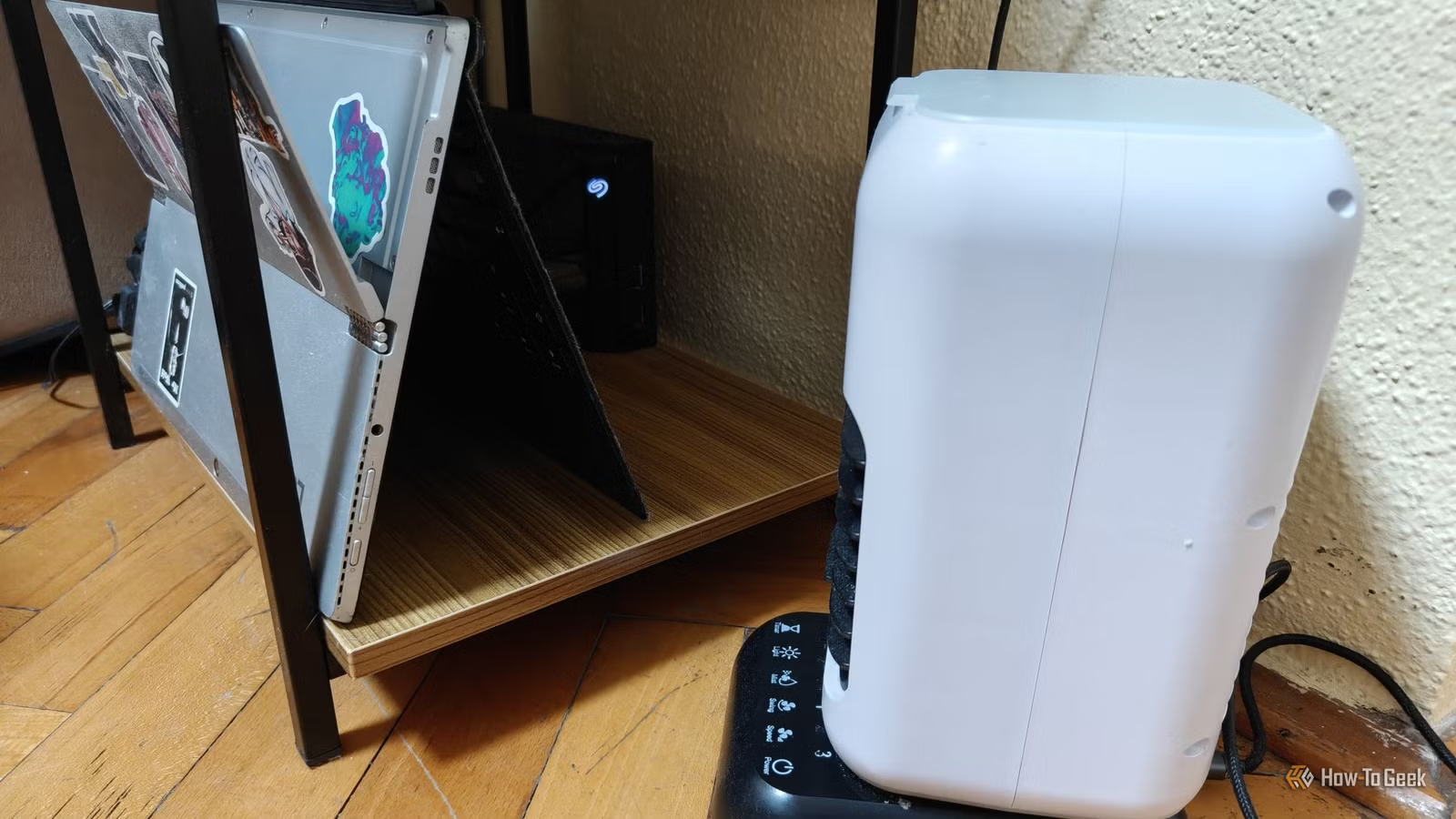
For desktop users, the common remedy for overheating is adding more case fans. I had a similar epiphany about my laptop—if only I connected a USB fan to help with airflow. It might appear unconventional, but the goal was straightforward: maintain airflow to disperse the hot air around the laptop.
Conveniently, I had purchased a few USB evaporative coolers before summer, so I plugged one into my laptop’s USB port and set it to the lowest fan speed (without adding water) to keep noise and power usage minimal. Lo and behold, it worked wonders. Even a regular USB fan would suffice, but this was readily available.
Now, my home server stays cool, and all of my applications run smoothly just like they did in the cooler weather.
This fix is temporary, but it could not have worked any better. Although I haven’t conducted formal thermal testing, the CPU now operates around a comfortable 50°C while simultaneously running all services and streaming through Jellyfin.
No Need for New Hardware—Just Improved Cooling
Using a USB fan in front of a laptop-turned-server may not win any awards for the cleanest solution to overheating, but it’s a testament to the innovative spirit of the homelab community. I repurposed a laptop that was never intended for heavy duties into a reliable server, and sometimes a simple USB fan is all that’s required to maintain its cool.