A single adapter could be all you need.
Revisiting the GameCube
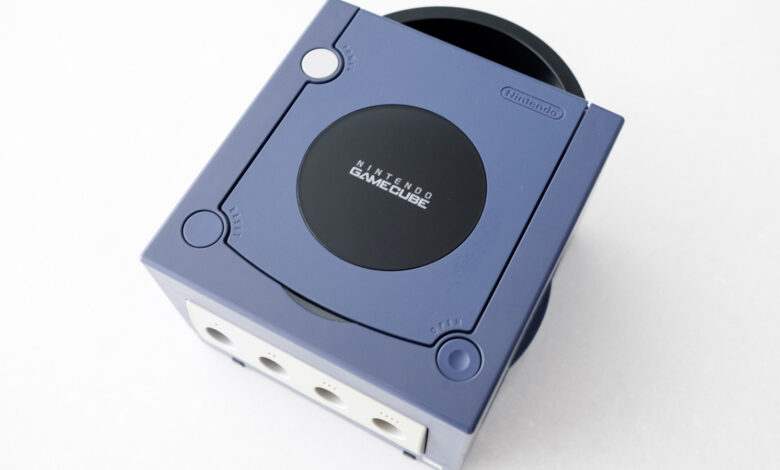
As the 25th anniversary of the GameCube approaches, it’s the perfect time to revisit Nintendo’s sixth-generation console. Although it didn’t achieve the same level of success as the PlayStation 2, the GameCube boasts a collection of fantastic games that remain enjoyable today, such as The Legend of Zelda: The Wind Waker and Metroid Prime. Many titles, including Resident Evil 4, even surpassed their PS2 counterparts on the GameCube.
A challenge when revisiting the GameCube is that it was designed for analog CRT televisions, which are largely outdated. In 2026, most televisions lack analog inputs. Fortunately, the console can still connect to modern TVs with some adjustments. This guide will walk you through the process.
Understanding Your GameCube Model
Unfortunately, not all GameCube models are the same. When Nintendo released the console in Japan on September 14, 2001, and later discontinued it in 2007, a major revision was made to cut costs. This means that if you possess the later model, connecting it to a modern TV can be more complicated.
The ideal model to have is the DOL-001 version. If your console is the DOL-101 variant, the connection will be trickier due to the absence of a Digital AV Out port, which was meant for 480p video output using compatible component video cables sold separately by Nintendo. Today, some companies produce adapters that allow the GameCube to output HDMI video via this same port.
Identifying a DOL-001 GameCube
Determining if you have a DOL-001 GameCube is simple. Look for two audio-video ports on the back of the console, one labeled Digital AV Out. Alternatively, check the label on the underside of the console; if it reads DOL-001, you have the right model.
Connecting a DOL-001 GameCube to an HDTV
If you have the correct model, connecting your GameCube to an LCD or OLED TV is straightforward with the appropriate adapter. While a variety of inexpensive HDMI adapters are available, the Retro-Bit Prism HD Adapter is highly recommended for its quality. This adapter features a USB-C port for easy software updates without dismantling the device.
Other options include the Carby from Insurrection Industries and a more budget-friendly choice from Bitfunx. Be aware that you might need to purchase a separate HDMI cable unless you already have one.
Simply attach the adapter to the GameCube’s Digital AV Out port, then connect an HDMI cable from the adapter to your TV. All three suggested models come with a remote that allows access to an on-screen menu to modify settings like output resolution.
To achieve optimal image quality, check for games that support 480p output. If you find one, insert it and hold the B button as the game starts. A prompt will appear asking, “Enable progressive scan display?” Select Yes to enhance your visuals. Some games also support native widescreen formats, usually adjustable within the game’s settings.
What If You Have a DOL-101?
If your GameCube lacks a Digital AV Out, consider using a device like the RetroTINK-2X Mini, which can convert the analog signal from your console to a digital format. You can connect the composite cables that came with your console to the RetroTINK-2X Mini, and then an HDMI cable from the device to your TV. RetroTINK also offers more expensive devices that can upscale the signal, ideal if you own various retro consoles.
Bonus: Gaming on Nintendo Switch Online
If the above methods seem too complicated, emulation offers another way to play your favorite GameCube games on a modern TV. For those with a Switch 2, Nintendo provides a selection of emulated GameCube titles through its Nintendo Switch Online service. To access this library, you must subscribe to the $50 per year Expansion Pack tier.
Despite a limited number of titles, the Switch 2 serves as an excellent platform for experiencing some of the GameCube classics. The console upscales games to 900p, improving visuals on contemporary TVs. Furthermore, multiplayer games like F-Zero GX offer online play for up to four players, along with controller remapping options.
As of August 2026, nine GameCube titles are available via Nintendo Switch Online, with two more expected soon. Check out the current lineup:
- The Legend of Zelda: The Wind Waker
- Soulcalibur II
- F-Zero GX
- Super Mario Strikers
- Chibi-Robo! Plug Into Adventure!
- Luigi’s Mansion
- Wario World
- Fire Emblem: Path of Radiance
- Pokémon XD: Gale of Darkness
- Super Mario Sunshine (August 13, 2026)
- Pokémon Colosseum (TBA 2026)
If you have a library of old GameCube games, you can emulate them by connecting a PC or laptop to your TV. The Dolphin emulator, which has been around for over two decades, is free and stable, offering features like resolution scaling and custom save states for an enhanced gaming experience. You don’t need a high-performance machine to run Dolphin, as most computers built in the last ten years should handle it well, although advanced graphics settings will require a more robust system.