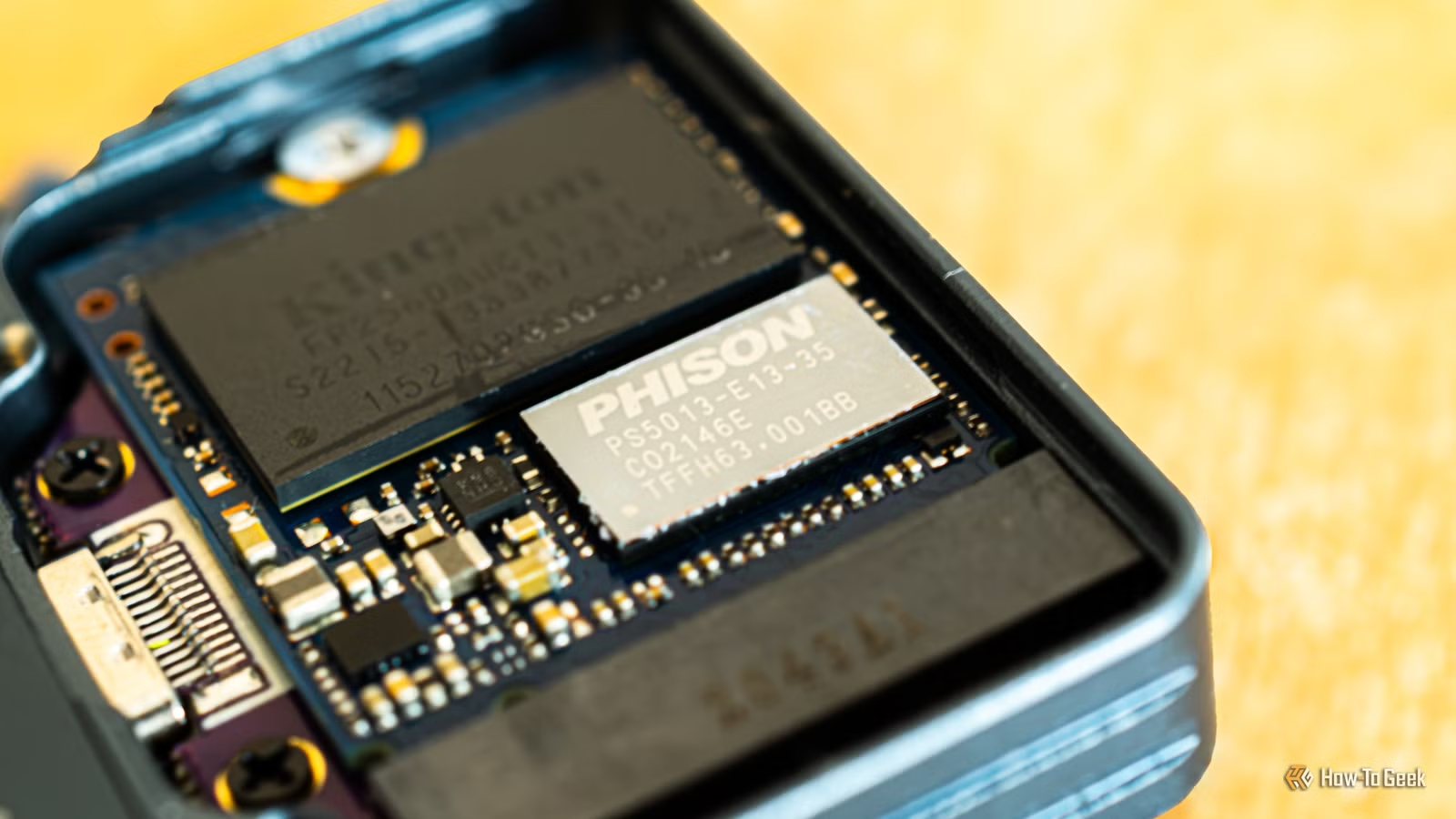
Solid State Drives (SSDs) are more than just basic storage devices; they incorporate sophisticated technology that goes beyond mere flash memory chips on a circuit board. While their designs are straightforward, SSDs rely on a specialized controller chip that governs essential functions such as data writing, relocation, and deletion, among other tasks.
Every SSD Includes a Controller
The Controller Functions as a Mini-Computer
Both traditional hard drives and flash memory-based devices, like SSDs, consist of a vital component known as a controller. This chip is crucial for the operation of any SSD—if it fails, even flawless flash memory chips won’t help the drive function. In essence, if the controller malfunctions, the entire drive becomes non-operational.
Modern SSD controllers are specialized components complete with their own processing cores, typically based on Arm architecture, and include dedicated features for tasks like error correction and encryption. These controllers run firmware essential for maintaining performance, similar to a lightweight operating system that can receive updates for enhancements and bug fixes.
To operate efficiently, each controller requires memory, primarily for a mapping table that keeps track of data locations on the flash memory. While this table is stored on the flash itself, many SSDs use a DRAM chip for quick access. In contrast, budget-friendly SSDs may utilize a small portion of the PC’s RAM with a technology called Host Memory Buffer (HMB) instead of including a DRAM chip.
Different controllers have varying levels of performance. High-end SSDs are paired with superior controllers, whereas budget options tend to use less advanced models. Thus, you may find two SSDs with identical NAND flash, yet one operates faster due to its more efficient controller. If you’re shopping for an SSD, it’s crucial to consider not only the PCIe generation and advertised speeds but also the quality of the controller.
The Controller Manages Data Writing and Retrieval
Picturing the Controller as a Data Parking Attendant
If you conceptualize the flash memory in an SSD as a parking lot, the controller acts like a parking attendant, directing drivers where to park their vehicles and where to find them later. The efficiency and speed of this manager can significantly affect how quickly drivers can locate parking spots or retrieve their cars.
For example, when you download a file from the internet, the data first arrives at the SSD’s controller, which references the mapping table to direct where to write the incoming bytes. It locates available pages and assigns the data to them.
Conversely, when you need to access a file, the operating system requests it, and the controller refers to the mapping table, finds where the various pieces of the file are, retrieves them from the flash memory, and sends them back to the operating system.
A controller’s speed directly impacts the SSD’s overall performance, contingent on the flash memory’s ability to keep pace. Top-tier consumer controllers in PCIe 5.0 SSDs can achieve impressive sequential speeds exceeding 14 GB/s, but that’s reliant on an equally fast receiving device. In most scenarios, SSDs typically experience lower speeds because other factors, like another SSD or internet limitations, often become the bottleneck.
Additionally, controllers perform much more than just data transfer; they continuously manage various tasks while the computer is powered on.
SSD Controllers Handle Numerous Additional Responsibilities
Significant Tasks Under Heavy Workloads
Even when your computer seems idle, numerous background processes are interacting with the primary drive, all filtered through the controller. This chip is consistently busy identifying data to read, write, and manage.
For example, it oversees operations like garbage collection and TRIM. Since flash memory can only be erased in whole segments, garbage collection shifts necessary data to new pages before erasing entire blocks, making them ready for reuse. TRIM informs the SSD about deleted pages, helping the controller avoid unnecessary transfer during garbage collection.
The controller is also tasked with managing faulty or worn-out blocks. It does this using over-provisioning, which designates extra space accessible only to the controller, allowing it to replace bad blocks with healthy ones and assist in garbage collection and wear leveling.
Because each NAND cell has a finite number of write and erase cycles, wear leveling becomes critical. The controller distributes writing tasks evenly across the memory cells to prevent premature failure of any one section.
Furthermore, the controller actively monitors the SSD’s health, managing power consumption and initiating thermal throttling if either the drive or its flash memory overheats. Many controllers also encrypt data written to NAND and use techniques to distribute the data evenly across available pages, ensuring data integrity.
Moreover, SSD controllers are tasked with error correction, which is necessary to maintain usability. They handle data refresh to rewrite data to new pages to prevent accumulation of errors that could render the data unreadable. Most SSDs also utilize a segment of flash as a fast SLC cache, which the controller manages by initially writing incoming data there before moving it to its final location, often during idle periods.
Complexity Behind SSD Controllers
The extensive duties performed by SSD controllers highlight their complexity; they are arguably the most intricate component of any SSD. You could accurately describe them as tiny computers that, instead of running conventional operating systems like Windows or macOS, operate on firmware designed for their specific functions and interactions with the system. When searching for a new SSD, remember that the controller chip is just as crucial—if not more so—than the flash memory it oversees.