I Integrated a Color Wheel into Home Assistant—Flipping Through Albums Like It’s 2008!

My initial fascination with the Walkman was unparalleled; I used it until it literally disintegrated. However, my true favorite music device has always been the iPod. The joy of browsing through albums with the Cover Flow feature by gliding my thumb over the click wheel was unparalleled. Recently, rediscovering an old remote with a similar wheel input inspired me to see if I could recreate that experience.
I Miss Cover Flow
Reliving the Joy of My iPod’s Album Browsing
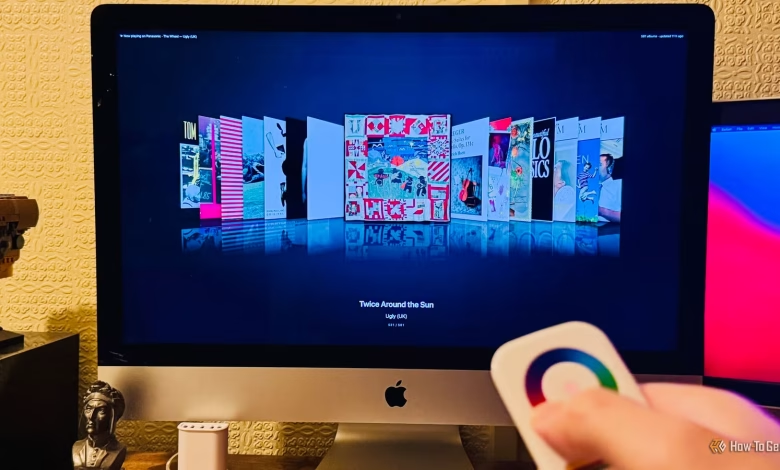
Cover Flow, a feature that allowed users to scroll through music files visually, was integrated into the iPod, iTunes, and Finder. It displayed a carousel of album covers, positioning one cover prominently at the center while the others were arranged to its sides. Users could navigate through these covers with the click wheel to select the album they wished to listen to.
Two elements made Cover Flow exceptional. Firstly, its aesthetic appeal, enhanced by subtle reflections beneath album covers, allowed one to appreciate the artwork of their music collection. Secondly, the satisfaction of swirling through the covers using the click wheel was unmatched. Unfortunately, Cover Flow has vanished from Apple Music, and the click wheel is now a relic of the past.
Rediscovering a Zigbee Remote with a Color Wheel
Could This Remote Help Me Revive Cover Flow?
I hadn’t thought about Cover Flow for a while until I stumbled upon an old Zigbee smart remote in my drawer. I had bought it in an attempt to create a universal remote to replace my previous setup, but it was unsatisfactory and ended up gathering dust.
This smart remote, primarily intended for lighting control, features buttons for turning lights on and off, sliders for brightness, and a large circular touch control at the top for color selection. Upon seeing the wheel, it instantly reminded me of the iPod’s click wheel, triggering the thought that I could potentially use it to navigate album covers again.
Connecting the remote to Home Assistant via Zigbee2MQTT, I recorded input from the remote while moving my thumb around the wheel. To my surprise, it produced varying values that represented my thumb’s position. By comparing these readings, I was able to determine the direction I was scrolling. While the remote was limited to only 29 readings before becoming inactive, I believed this was a manageable issue.
Realizing Others Had Similar Ideas
Exploring Pre-Existing Cover Flow Solutions
Once I had the remote working, the next step was to facilitate album browsing in a Cover Flow-like format on my Music Assistant dashboard. To my surprise, various custom dashboard cards already existed to display albums in this visual style. However, none of them aligned perfectly with my needs.
Turning to Claude Code for assistance, I was able to quickly build a functional model without doing the heavy lifting myself. Claude developed a system leveraging my Music Assistant library, filtering out albums lacking cover art or containing fewer than five tracks.
Initially, the first version allowed Home Assistant to translate the color wheel data into commands for switching album covers, but this resulted in a jumpy experience. Eventually, Claude adjusted the implementation to enhance the responsiveness, allowing for a smoother scrolling motion by directly reading from the remote and transitioning the album covers gradually.
Using My iMac as a Giant iPod
A 27-inch Display Feels Transformative
By making further refinements, I was ecstatic with Claude’s outcome. I now have a full-screen Cover Flow dashboard on my aging iMac, which looks fantastic on its 27-inch 5K display. To play music, I simply rotate the color wheel and hit the ON button to select an album.
Once an album begins to play, a Now Playing screen activates, showing the current track details and lyrics, highlighting the exact line being sung. Scrolling through the color wheel allows me to switch tracks, while another button facilitates a quick return to the Cover Flow interface for album selection.
This setup has far exceeded my expectations and has provided a fresh and enjoyable way to rediscover my music collection, akin to a modern iPod experience on a large scale. I’ve even begun to notice how many lyrics I have sung incorrectly over the years.
Good Ideas Can Come from Unexpected Places
This entire project originated from spotting an old remote and seizing the idea it sparked. Inspiration can often come from the most unlikely sources, and the projects that emerge from these moments can yield fantastic results. My next ambition is to replicate this setup in my living room for a larger iPod-like experience.