I Explored OpenAI’s Innovative AI Keyboard — A Playground for Coders and a Puzzle for Everyone Else

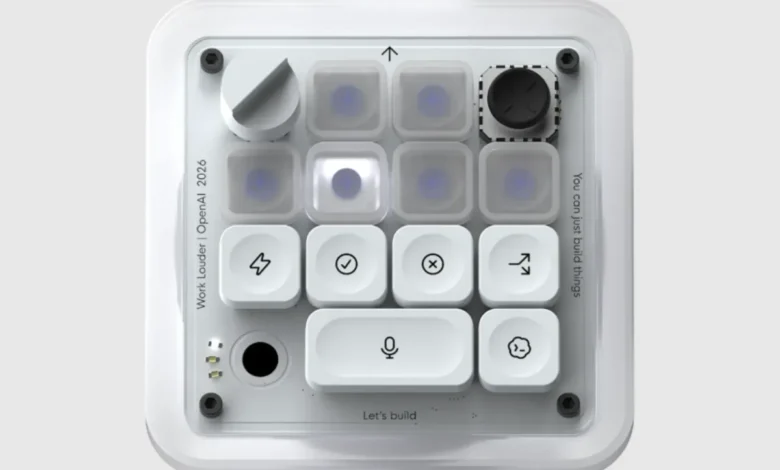
Last week, OpenAI introduced its inaugural hardware product — an innovative keypad designed to work alongside ChatGPT. Named Micro, this device was created in partnership with Work Louder, a keyboard design firm. It stands out as a stylish workplace novelty that is likely to captivate tech aficionados, leaving others somewhat perplexed.
The release of OpenAI’s hardware has not been without controversy. Recently, the company faced a lawsuit from Apple, accusing it of misappropriating trade secrets — a legal struggle that promises to be drawn out. Simultaneously, there are rumors of another smart home device in the works at OpenAI, reportedly developed by former Apple engineers and intended to complement ChatGPT.
As the legal disputes unfold, OpenAI’s most notable offering remains Micro, a uniquely designed keypad that appears to cater extensively to the tech community.
A test unit of Micro was provided for review. Upon first handling the keypad, its robust build is immediately noticeable — so much so that it could serve as a sturdy paperweight if the AI accessory does not achieve commercial success. Additionally, the device’s packaging, featuring a minimalistic white box, carries an aesthetic reminiscent of Apple’s sleek designs.
Micro features a layout comprising six customizable “agent” keys at the top, designed to perform specific functions within ChatGPT or the coding tool Codex. Below these are six command keys that allow for controlling these applications. The keypad can connect to computers via Bluetooth or USB.
One of the most useful features of Micro is its voice dictation button, allowing users to simply speak their commands to the app. By holding down the dictation button and speaking, users can efficiently submit requests with a single tap on the “send” button.
Customization options for the Micro keypad can be accessed directly within ChatGPT, where users can adjust settings such as the brightness of the keys and the specific functions assigned to each key.
However, the response from hardcore coders, the primary target audience, has not been overwhelmingly positive. Many reviews from Reddit users have been critical, with comments labeling the device as a “prank” and unappealing to serious programmers. A thorough critique from a smaller independent outlet condemned the $230 price tag, citing cheaper alternatives as more reasonable options.
New users may find the learning curve challenging when it comes to mastering Micro’s functionalities.
Once familiar with programming the keypad, users may discover it to be quite enjoyable. Assigning different ChatGPT sessions to specified keys allows for easy transitions between various projects, and when paired with the dictation feature, it enhances productivity.
Nevertheless, there is a learning curve. The buttons use a color-coding system: white indicates that an agent is idle, blue means it is processing, green signifies task completion, and red shows an error. Users will need to memorize this, along with the specific commands tied to each key.
The critical question remains: Is the Micro keypad more efficient than using a laptop? In essence, why invest time in learning to operate this device when users are already proficient with their existing computer setup?
Ultimately, the usefulness of Micro depends significantly on how frequently one utilizes ChatGPT. Those who don’t engage with AI regularly may not find it worthwhile.
However, for dedicated ChatGPT users who have $230 to spare and have a penchant for vintage-style hardware with tactile buttons, Micro could be a genuinely enjoyable investment.