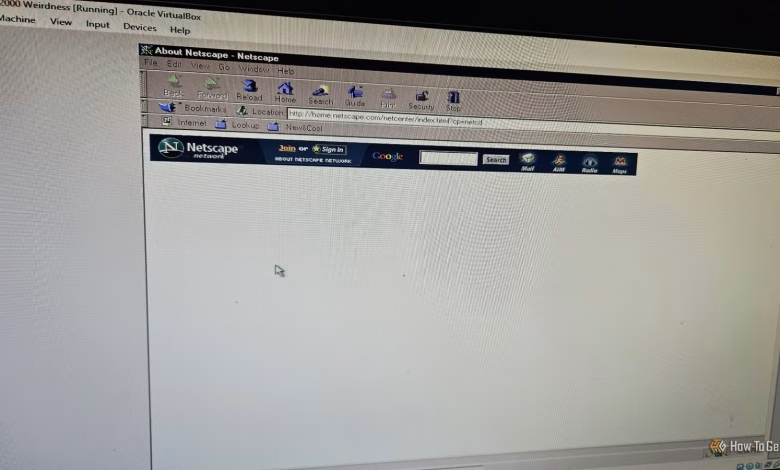
The blend of nostalgia and idle time can spark a flurry of creative pursuits and entertaining escapades. Recently, I decided to take a detour from my retro gaming project on Windows 2000 via VirtualBox, after learning about a tool called WebOne. My first move was to install Netscape Navigator and explore the internet as if it were the early 2000s. Here’s my approach to achieving that experience.
For this endeavor, I used Windows 10 to set up the proxy while conducting tests in a Windows 2000 virtual machine using VirtualBox.
WebOne: A Blast from the Past
Interacting with Old Browsers on Modern Websites
WebOne serves as an HTTP 1.x proxy server that offers a unique capability: it bridges the gap between legacy browsers and the current web landscape. If you ever wanted to surf with Netscape Navigator, this tool allows you to do just that.
Think of WebOne as a translator between two different eras. While modern browsers and websites communicate seamlessly, older browsers often struggle to understand the new lingo. By acting as a mediator, WebOne helps older software interact with contemporary websites. It allows Netscape Navigator to believe it’s browsing a minimalist 90s webpage, simplifying images and eliminating complex scripts that newer browsers utilize.
Setting Up WebOne on a Modern Machine
Quick and Easy Server Configuration
As someone who prefers self-hosting, WebOne piqued my interest for experimentation. The process began with downloading the proxy server and my chosen vintage browser, followed by configuring the settings.
Multiple versions of the proxy are available, but I opted for the comprehensive version that includes both the full proxy and .NET framework. After extraction to a dedicated folder, I located the server files and the webone.conf file.
Fortunately, users need not modify the configuration, as it’s pre-set to function properly. WebOne defaults to port 8080, which I chose to leave untouched since nothing I was running competed for that port.
To verify the server’s operation, I ran webone.exe, then tested https://localhost:8080 in my browser.
Using Netscape Navigator on a Modern System
Simple Setup Steps
A word of caution: refrain from logging into personal accounts or handling sensitive information while using WebOne. It’s best viewed as a nostalgic playground rather than a secure environment.
Getting the server operational was straightforward; the next step involved setting up the client. I downloaded Netscape Navigator 4.0.4 and booted up my Windows 2000 virtual machine.
To access the proxy server, navigate to Edit > Preferences > Advanced > Proxies and select Manual Proxy Configuration. There, input the numerical IP address of the Windows 10 host along with port 8080.
Revisiting Favorite Websites
A Nostalgic and Frustrating Experience
My first stop was Weird Al’s official website, a nostalgic favorite from my earlier internet days. However, it promptly bombarded me with a series of JavaScript errors, prompting me to disable JavaScript entirely. Remarkably, I remembered how to do this without consulting any resources.
Although the Internet Archive employs JavaScript, WebOne’s built-in Wayback Machine feature was intriguing to explore.
While the retrieval of Al’s site was somewhat functional, it was still quite buggy. Yahoo, another site I frequented, fared poorly, displaying jumbled text with broken images. On a brighter note, Zophar’s Domain functioned well, albeit its modern iteration is more appealing. Dr. Demento’s Website loaded decently, but our personal site had its share of issues.
Exploring Internet Explorer for Even More Nostalgia
Performance Notably Lacking Compared to Netscape
I also had fond memories of Internet Explorer, so I obtained the 5.5 version ISO for testing. This version included scripting support, raising hopes for improved site functionality. After configuring the LAN settings for port 8080, I found it launched quicker than Netscape.
Though browsing overall was hit-or-miss, Dr. Demento’s site performed adequately while others, including major platforms like Yahoo and CNET, struggled to load correctly. I eventually managed to bring up our site with varied success. While I enjoyed navigating with Netscape, my experience more accurately reflected my formative web days. At least for the time being, my nostalgia felt satisfied.
Engaging in a Workshop of Web Preservation
While playing with WebOne is a walk down memory lane, it also fosters an appreciation for web preservation and the educational opportunities it presents about computing history. Using older browsers for modern sites might not be optimal, but tools like WebOne can significantly contribute to preserving past web experiences. Additionally, the feature supporting FTP transmissions adds another layer to its value.
Ultimately, experimenting with WebOne and reliving old browser experiences proved to be enjoyable and worthwhile. This is likely an adventure I’ll revisit in the future.