Your Apple Watch can provide essential support as you navigate aging, from emergency alerts to medication notifications.
People of all ages own Apple Watches, meaning that wearing one does not signal frailty, as with medical pendants. This differentiation is significant for older adults who prefer not to be labeled as “seniors.” They recognize that age does not hinder their ability to lead independent lives, and an Apple Watch can play a vital role in maintaining their health.
The potential for technology to enable older adults to live independently is appealing to health-conscious baby boomers. Features like movement reminders, fitness tracking, and step counters promote an active lifestyle, contributing to better health outcomes. Additionally, ongoing investments by Apple in healthcare research have improved the smartwatch’s ability to detect short-term illnesses and enhance self-management of health.
With the Find My app, family members can keep track of their elderly relatives’ locations, fostering peace of mind. Furthermore, it’s essential for every senior with an Apple Watch to configure several crucial health alerts.
Crucial Emergency SOS Feature

Image Credit
The Apple Watch offers important emergency features that can be vital for seniors, including Emergency SOS, Medical ID, and Emergency Contacts.
Emergency SOS allows users to contact emergency services during critical situations. To activate this feature, press and hold the side button, then drag the Emergency Call slider or continue holding the button until the call is made. This is only available on cellular models with a proper plan, Wi-Fi calling, or when paired with an iPhone nearby.
To enable Emergency SOS, go to the Watch app on your iPhone, select Emergency SOS, and toggle on the Hold Side Button to Dial option.
Your Medical ID and Emergency Contacts can be managed in the Health app on your iPhone. By tapping your profile, selecting Medical ID, and then Edit, you can enter details and add trusted Emergency Contacts. It’s crucial to keep your allergies or health conditions updated for medical personnel to provide appropriate care.
Fall Detection for Added Safety
Image Credit
According to the CDC, more than one in four adults over 65 experience falls each year, with a significant number facing hospitalization due to related injuries. As many seniors live alone, this increases their risk of falls. Fall Detection can provide crucial protection.
This feature activates automatically when users indicate they are 55 or older in the Health app. If the built-in sensors of the Apple Watch detect that the user is unresponsive following a fall, it will automatically contact emergency services.
In the event of a fall, an alert prompts the user to confirm whether they fell. If they do not respond, the system will initiate a call to emergency services. To set up Fall Detection, enable it through the Emergency SOS settings on your iPhone or directly on the Apple Watch under Settings > SOS.
Recent models also feature Crash Detection, which functions similarly if an accident occurs while driving.
Heart Health Monitoring Features
Image Credit
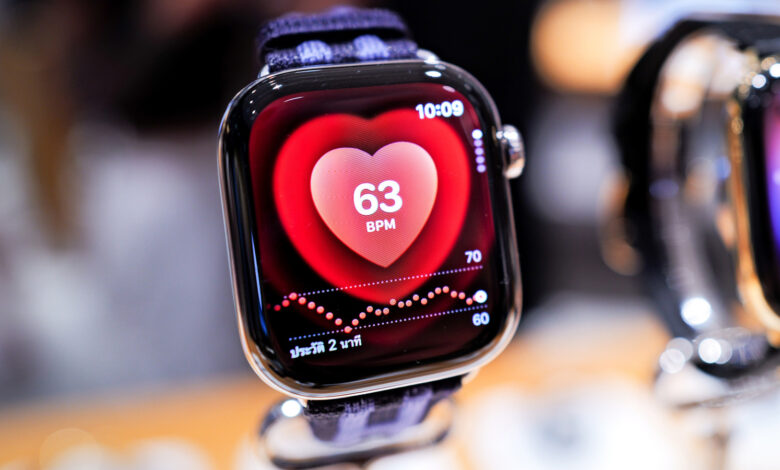
Statistics show that someone dies from cardiovascular disease every 34 seconds in the U.S. While an Apple Watch cannot predict heart attacks, it effectively monitors overall heart health and helps detect irregularities like atrial fibrillation.
The device continuously measures heart rate using LED lights on the back, and can provide ECG readings to help identify abnormal heart rates. To obtain an ECG reading, open the ECG app, rest your wrist, and touch the Digital Crown — results will be available within 30 seconds.
The Apple Watch will also send notifications if your heart rate goes beyond set limits, automatically syncing this data with the Health app on your iPhone, where you can evaluate your overall cardiovascular fitness.
Enable heart-related monitoring options by going to Settings > Heart and switching on the desired features.
Medication Reminders to Keep You on Track
Image Credit
Regularly forgetting to take medication? The Medication Reminders feature can assist you in staying timely with your doses. To activate it, open the Health app on your iPhone, go to Browse > Medications, then select Add Medication. Follow through to set your medication schedule.
You can add multiple prescriptions, and your Apple Watch will vibrate and send notifications when it’s time for your next dose. Additionally, you can log your medication adherence for discussions with your healthcare provider.
The Apple Watch also features sleep tracking that can raise alerts for potential sleep apnea. To enable this, access Sleep on the watch or within the Health app on your iPhone, and enable relevant tracking options.
Accessibility Features for Enhanced Usability
Apple is committed to ensuring its technology is accessible to everyone, including those with disabilities. The Apple Watch is equipped with features designed to promote independence among users.
As age-related hearing loss becomes prevalent, Apple’s Sound Recognition tool is helpful. This function utilizes the watch and iPhone to identify important sounds like doorbells or alarms.
To activate Sound Recognition, go to Accessibility Settings on your iPhone, select Sound & Name Recognition > Sound Recognition, and enable the sounds you want to identify.
For users facing visual impairment, Apple Watch allows for font size adjustments to enhance readability by accessing Control Center and using the Digital Crown.
For more information on these features, Apple’s support resources offer a wealth of guidance.