How I Transformed My Jailbroken Kindle into a Goodreads Sync Machine for Real-Time Reading Stats

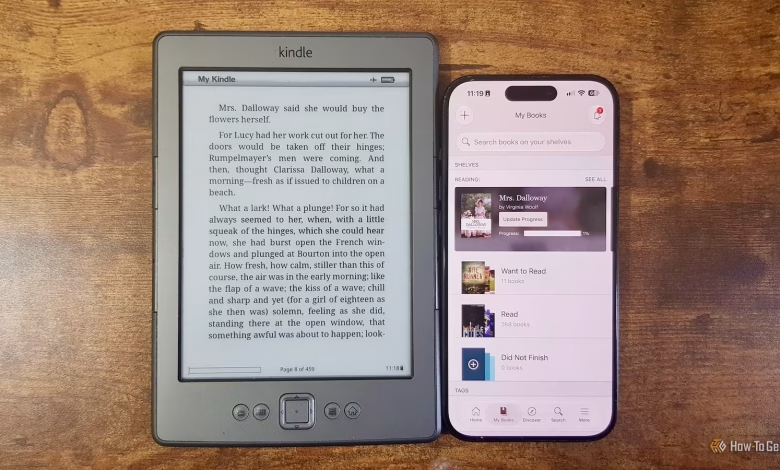
Recent Kindle devices have introduced a feature that allows users to connect their Kindle and Goodreads accounts, enabling the sharing of reading progress across both platforms. In contrast, my older Kindle 4 lacked this capability, and using a jailbroken version of a newer Kindle with KOReader means sacrificing this integrated functionality. Fortunately, I managed to find a KOReader plugin that enables syncing my reading statistics with Goodreads.
Tracking Reading Progress with KOReader
No Direct Connection to Goodreads
Unlike some newer Kindle models, KOReader offers no built-in method to share data with Goodreads. However, it does an excellent job of recording my reading metrics.
Goodreads serves as a social platform for readers to monitor their reading habits. Users can maintain lists of books they intend to read, share reviews, and discover what friends are reading, along with receiving tailored recommendations. A key feature is its ability to track the books currently in progress and those that have been completed.
Modern Kindle devices permit linking with Goodreads, so whenever a new book is opened, it automatically gets added to Goodreads under the “Currently Reading” category, and upon completion, it shifts to “Read.” Unfortunately, my fourth-generation Kindle does not support this integration due to Amazon ceasing its support. After jailbreaking my Kindle and installing KOReader, I found that while it effectively keeps track of my reading, it doesn’t sync directly with Goodreads.
ShelfSync Bridges the Gap
Plugin Facilitates Goodreads Syncing
To overcome this limitation, I turned to ShelfSync, an open-source plugin designed for KOReader that can transfer reading statistics to a Goodreads account. This plugin also supports syncing with other platforms like StoryGraph and Pagebound.
Installing ShelfSync can be done by placing it in the KOReader plugins folder or using the Storefront plugin on your Kindle. However, linking it with Goodreads requires a more complex process compared to standard Kindle integration. Users must log into Goodreads via a computer and utilize the plugin’s cookie-import feature to copy cookies from their browser that signify an active session on Goodreads.
This process spared me the hassle of entering my account credentials directly on the Kindle, which can be quite cumbersome on non-touch devices.
Automatic Updates to Goodreads
Reading Stats Reflect in Real-Time
Once I got ShelfSync operational, I tested it by opening Mrs. Dalloway by Virginia Woolf—a title not previously listed in my Goodreads shelf. Shortly after starting the book, I noticed it had automatically appeared in my “Currently Reading” section on Goodreads.
With the default setting of five-minute syncs, I felt I might be overwhelming my own Goodreads account with constant updates, so I adjusted the settings to sync for every 25% of the book completed. ShelfSync can also automatically update progress whenever you open a book.
When I marked Mrs. Dalloway as “Finished,” it transitioned to “Read” on Goodreads, helping me track my progress for this year’s reading challenge without visiting the Goodreads site.
Challenges with ShelfSync
Not as Effortless as Native Integration
While using ShelfSync is beneficial, it is not as fluid as the built-in integration available on some Kindle devices. This is partly due to the proprietary connection methods that Amazon employs with Goodreads, which makes external access less straightforward.
At times, when opening new titles, ShelfSync fails to find exact matches from the Goodreads library, requiring me to manually confirm which title corresponds with the one I’m reading. The saved cookie can also expire, leading me to use another tool for refreshing cookies on my computer for continued access.
An additional complication, possibly specific to my older Kindle model, arose when ShelfSync attempted to sync reading progress before the Wi-Fi was fully connected, resulting in failed updates. To remedy this, I added a script to ensure a Wi-Fi connection is established first.
On the upside, ShelfSync can manage tasks that the standard Kindle to Goodreads integration cannot. For instance, sideloaded books—which are not part of your Amazon Kindle account—typically don’t sync unless workarounds are applied.
Effortless Book Tracking
Historically, I struggled to maintain an updated Goodreads account, often falling behind on entering numerous books and marking them as “Read.” With ShelfSync, this process is automated, allowing me to effortlessly keep track of my Reading Challenge goals.