Summary
- A groundbreaking emulator named XenDroid offers impressive Xbox 360 emulation capabilities on Android devices.
- Tested titles include Call of Duty 2, Forza Motorsport 2, and Project Gotham Racing 3, all performing well.
- Optimal performance is noted with devices featuring Snapdragon 8 Gen 2 or better hardware.
Recently, the realm of Android gaming emulators has taken a significant leap forward, particularly with the emergence of a new Xbox 360 emulator. The XenDroid emulator has made quite an impact since its launch a few weeks ago.
Launched via GitHub, XenDroid represents a major advancement in Xbox 360 emulation for Android users. The developer initially started this project as a variation of the aX360e emulator before deciding to base it on the Xenia Edge PC emulator framework.
To achieve the best performance, the developer recommends using a device equipped with a Snapdragon Gen 2 processor, specifically the Snapdragon 8 Gen 2, complemented by Adreno 740 graphics or superior. The emulator is compatible with custom Turnip GPU drivers, specifically recommending options such as Whitebelyash or StevenMXZ. Users with devices powered by MediaTek, Samsung Exynos, or Google Tensor processors may experience subpar performance.
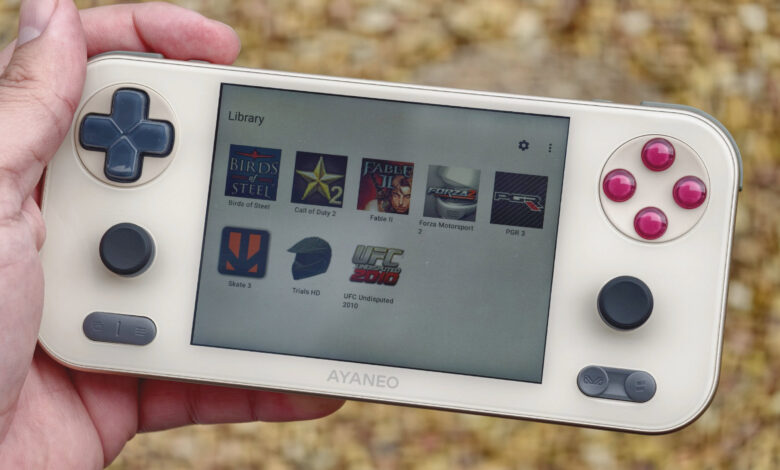
During my testing with an AYANEO Pocket S Mini featuring a Snapdragon G3X Gen 2 chipset, I discovered that while not all games worked seamlessly, there was notable performance with several titles. Games like Call of Duty 2, Project Gotham Racing 3, and Forza Motorsport 2 were playable or mostly playable, while others like Skate 3, Fable 2, and UFC 2010 suffered from slowdowns and glitches. Trials HD presented severe graphical issues.
Your experience may vary based on your device and settings. For example, Fable 2 seems more stable on high-end hardware. The developer also recommends disabling the “Readback Resolve” setting for a performance boost; however, some titles may require this setting for accurate visuals.
Setting up XenDroid is straightforward, with no need for Xbox 360 firmware. I found it compatible with my handheld’s physical controls, but it’s worth noting that the emulator struggles to read files from nested folders. Therefore, placing game files in a single root directory is advisable.
Overall, the advancements in Android emulation for Xbox 360 and PlayStation 3 are promising. With the launch of the aPS3e emulator last year alongside the aX360e, and more recent releases such as RPCSX-UI for PS3 and various others, it’s clear we are witnessing significant progress in this area, albeit still in early stages.