Reviving Vintage Machines: The Underrated OS That Outshines Lightweight Linux

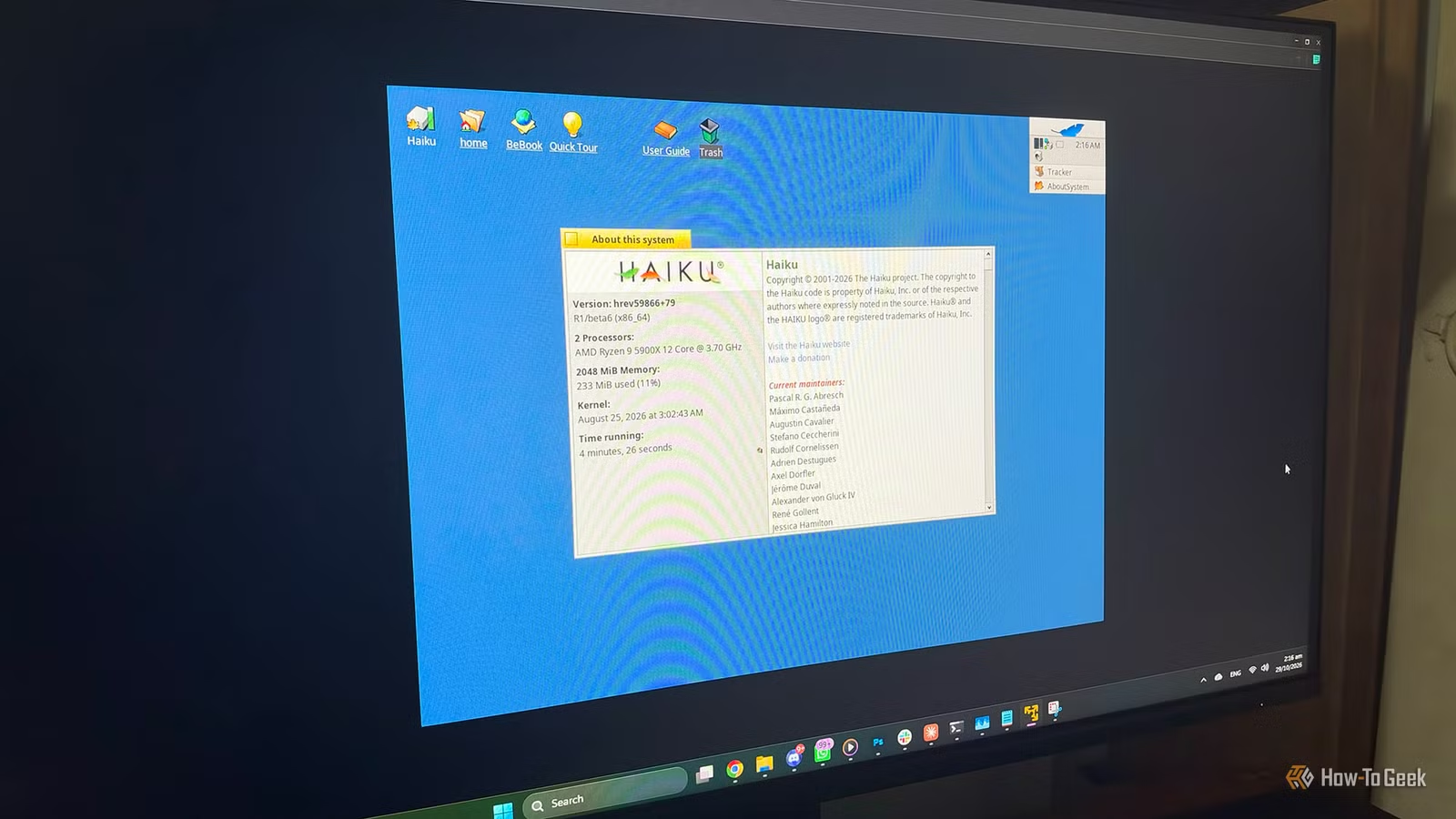
Many outdated computers find new life with lightweight Linux distributions, but the options are dwindling as certain distros drop support for older hardware. Haiku, an open-source successor to BeOS, offers a refreshing alternative. Its recent R1/beta6 release presents a compelling case for giving new purpose to legacy systems.
What is Haiku OS?
A Successor to BeOS, Designed as a Unified System
Haiku is a standalone, open-source desktop operating system that draws inspiration from BeOS, which was created by Be Inc. during the 1990s as a modern option to both Mac and Windows. BeOS attracted a dedicated user base due to its speed and efficient media handling, but it ultimately failed to capture a long-term market, leading to its discontinuation after Palm acquired its assets in 2001. That same year, a group of enthusiasts initiated a project called OpenBeOS to recreate the platform as open-source software.
Crucially, Haiku is not based on Linux, nor is it a Unix derivative. It features its own kernel, driver framework, graphical user interface, and a set of bundled applications—all developed by a single team with a shared vision. Unlike many Linux distributions that piece together various independent components like kernels, display servers, desktop environments, and initialization systems, Haiku is designed as an integrated whole. This cohesive architecture contributes to its consistent performance and user experience, while still maintaining a level of POSIX compatibility that facilitates software migration from Linux and other Unix-like systems.
Haiku also carries over several distinctive features from BeOS, such as its BFS file system, which supports extended attributes and enables quick file searches akin to database indexing. Additionally, its package manager operates by mounting compressed packages over the active system rather than unpacking them, allowing for clean installations and easy rollbacks.
Having been in beta for several years, Haiku’s development is ongoing. The recent R1/beta6 release arrived roughly two years after beta5, which launched in September 2024, and coincided with the project’s 25th anniversary. This latest version is available for both 32-bit and 64-bit x86 architectures, with an ARM64 version currently under development.
Why Consider Haiku OS?
Small Resource Footprint, Real Applications, and Continued 32-bit Support
Haiku’s most convincing argument for use on older hardware lies in its minimal system requirements. It can run on machines starting from a Pentium II with just 256 MB of RAM, and the new beta further optimizes its memory usage, enabling graphical systems to start with as little as 128 MB. This improvement stems from the kernel’s new malloc implementation, derived from OpenBSD, enhancing overall performance and freeing memory for other processes.
While lightweight Linux distributions can achieve similar results, they often do so by removing essential components and employing minimal window managers, leading to a stripped-down desktop experience. Haiku avoids this necessity. Because its kernel, interface, and core applications are developed in tandem, fewer layers compete for system resources, resulting in a rich desktop experience suitable for low-end machines.
Another advantage for Haiku lies in its support for aging hardware. Major Linux distributions have increasingly phased out 32-bit x86 support. For example, Ubuntu has not provided 32-bit installation media for some time, and Debian 13 has also stopped offering it as a standard installable option. In contrast, Haiku still distributes an official 32-bit version alongside the 64-bit one, which is crucial for maintaining compatibility with original BeOS applications—particularly for older systems like a Pentium 4 or earlier netbooks.
The software situation for Haiku has improved significantly as well. The beta6 release supports Firefox and its variants, provides hardware virtualization through QEMU, and enhances both POSIX and overall hardware compatibility. Additionally, HaikuDepot, its built-in app store, provides a broad selection of ports, including productivity software like LibreOffice and various media players. This version also resolves over 530 bugs and improvement requests, making it the most refined version yet.
Should You Install Haiku on Your Old PC?
Ideal for Experimental Projects, Not Yet for Everyday Use
If you have an aging PC collecting dust, Haiku is worth exploring, as long as your expectations are realistic. Being a beta software project, it cannot guarantee data safety. Users of beta6 have also reported some inconsistencies with specific hardware configurations. Thus, Haiku is suitable for secondary machines, retro computing endeavors, or simple writing setups, but may not be a wise choice for day-to-day computing needs or for devices holding critical information.
Hardware compatibility poses another challenge. As Haiku lacks hardware-accelerated 3D graphics, it relies on software rendering, which is satisfactory for standard desktop usage but not viable for modern gaming or GPU-dependent applications. Wi-Fi support depends on drivers ported from FreeBSD, functioning well with some chipsets but not all, making wired Ethernet or a known compatible USB adapter the safer choice. Additionally, power management and Bluetooth capabilities are less developed compared to Linux, which could be a concern for laptop users.
It’s also important to note that the minimum requirements refer to a system that can boot, not necessarily one that can handle today’s web performance comfortably. Using a modern browser like Firefox may struggle with just 256 MB of RAM, so configurations with 1 to 2 GB would offer a notably improved experience. For those deciding which version to use, the 64-bit build is recommended for any compatible CPU, while the 32-bit version is designated for CPUs lacking 64-bit support or those needing to run legacy BeOS applications.
To determine if Haiku works well with your machine, write the image to a USB drive and test it in live mode prior to installation. If your graphics, storage, and networking function properly, those features should translate well to an installed version. However, if specific software you need is Linux-exclusive or if you prefer a distribution with regularly scheduled security updates, a lightweight Linux operating system remains the more practical alternative.
Haiku Provides a Lightweight, Integrated Second Life for Old PCs
Although Haiku isn’t a catch-all replacement for Linux, it often feels faster and more cohesive on older hardware. With its minimal requirements, ongoing 32-bit support, and the inclusion of Firefox in R1/beta6, it presents a compelling opportunity to breathe new life into forgotten computers.