Shimul Sood
Imagine engrossing yourself in a YouTube video only to be interrupted by an ad. It’s frustrating, and many share this sentiment. Opting for an ad-blocker seems more appealing than subscribing to YouTube Premium just to get rid of ads.
If you’re weary of YouTube’s incessant reminders about ad blockers, here’s how you can enable one on your device.
How do you handle YouTube ads?
119 votes
Blocking YouTube Ads with DuckDuckGo

Shimul Sood
Before diving into personal experiences, let’s set you up with the browser.
Users on Mac, Windows, or iPhone will be pleased to know that the latest version of the DuckDuckGo browser comes with built-in YouTube ad blocking, no configuration necessary. Simply ensure your app is up to date and start watching your usual YouTube content.
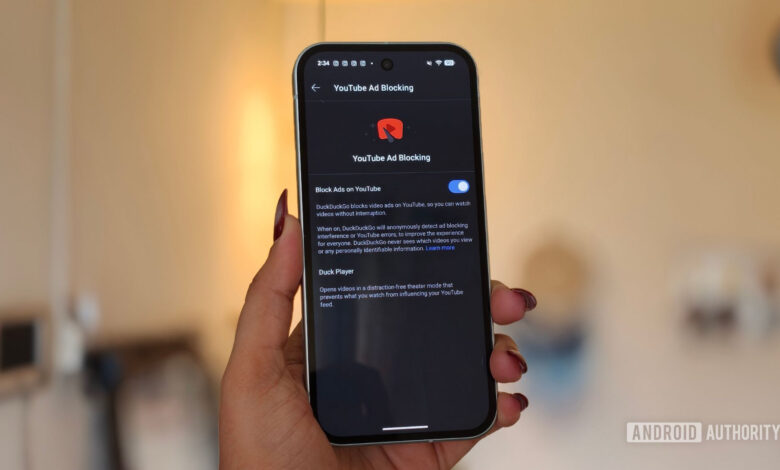
If you’re on Android, there’s a slight extra step. DuckDuckGo mentions the feature will be default soon, but for now, manual activation is needed. Update your app and follow these instructions:
- Launch the DuckDuckGo app on your Android device.
- Open a new tab and tap the menu icon (three lines) in the corner.
- Select Settings.
- Scroll to Other Settings and tap YouTube ad-blocking.
- Switch on the Block Ads on YouTube toggle.
Once set, just open YouTube in the DuckDuckGo browser and enjoy uninterrupted videos.
Unexpectedly Smooth Experience

Shimul Sood
On my Google Pixel 10a, this setup took less than a minute. Initially skeptical due to past experiences with unreliable workarounds, I proceeded to test it out.
I started with a one-hour video episode. To my surprise, there weren’t any interruptions from ads. It felt unusual, having grown accustomed to regular ad breaks.
I pressed play and watched an entire video without any ads.
Encouraged, I watched various content types — music videos, podcasts, cooking shows, and more — without a hitch. Even though the DuckDuckGo team noted potential buffering, I experienced none during my testing.
On my iPhone, MacBook, and Windows PC, everything ran just as smoothly since the ad-blocking feature is enabled by default. I found myself staying on YouTube longer than intended simply because I wasn’t being interrupted by ads.
A Handy Bonus Feature

Shimul Sood
While exploring the browser, I discovered Duck Player, which enhances the YouTube ad-blocking experience.
Rather than using YouTube’s standard player, Duck Player employs DuckDuckGo’s internal video player, offering better privacy since it follows stringent privacy measures for embedded videos. This means no tracking cookies or tailored ads during your viewing. Additionally, videos watched through Duck Player won’t affect recommendations on YouTube, nor will it save your spot in playlists.
Duck Player and YouTube ad blocking complement each other, providing a purer and more private YouTube experience.
If you’re interested, you can enable Duck Player in the browser settings; both features work together for a better experience.
How DuckDuckGo Manages This

Shimul Sood
This led me to wonder how DuckDuckGo accomplishes this, especially given YouTube’s efforts to combat ad blockers. Upon investigation, I found that DuckDuckGo utilizes community-maintained filter lists from uBlock Origin, which are regularly updated by its open-source community to adapt to how websites like YouTube serve ads. Additionally, DuckDuckGo makes its own adjustments to enhance compatibility and performance.
My hope is that this smooth functionality continues, as it perfectly fulfills my needs. I avoid adding another subscription to my budget, and after testing it across various devices, I genuinely enjoy uninterrupted viewing on YouTube.
If you feel the same way, I highly recommend trying out this solution.
Thank you for being part of our community. Please review our Comment Policy before posting.