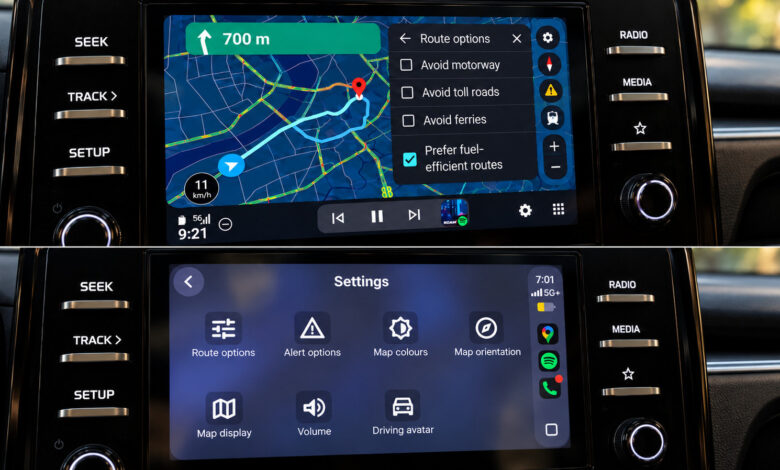
In my comparative test of Google Maps on Android Auto and Apple CarPlay in the same vehicle, I found that Android Auto offered a smoother navigation experience for everyday tasks.
While Google Maps functions on both Android Auto and Apple CarPlay, the user experience differs significantly, even on the same vehicle setup. I executed the same searches, adjusted routes, and navigated using both systems consecutively, leveraging the same infotainment interface.
Overall, the core features were similar on both platforms, providing functionalities like speed monitoring, lane guidance, incident alerts, and options for alternative routes, in addition to the typical controls for avoiding tolls, highways, and ferries. However, the disparities became more apparent as I explored Maps beyond simple navigation.
Android Auto showcased advantages that ranged from subtle interface enhancements to features that consistently outperformed their Apple equivalents. While CarPlay has its strengths, Google Maps seems to integrate more seamlessly into Android Auto. This revelation comes as no surprise.
Gemini simplifies searches and route modifications without screen interaction
One of the most significant differences lies in how users access Gemini, further tipping the scale in favor of Android Auto.
For starters, activating Gemini is simpler on Android Auto; I could engage it using voice commands without needing to touch the screen. Although a Gemini button was eventually added to Google Maps on CarPlay, it required screen interaction to access voice commands. At the time of my testing, Google’s support documentation indicated that Gemini was yet to launch on CarPlay.
Moreover, making route changes felt faster on Android Auto. For instance, I could quickly ask for a gas station and then a pharmacy, without having to repeat the initial command. In contrast, CarPlay performed these tasks only after Gemini was activated, often with noticeable delays.
However, it wasn’t flawless; at times, Gemini encountered loading issues. Nevertheless, initiating voice commands without reaching for the screen remains a crucial advantage, especially as the display is centrally mounted in my 2025 Kia Sonet.
Viewing search results is more intuitive, and the map invites exploration
A further advantage emerged when searching for points of interest while on the road. In my tests, Maps presented a variety of options complete with ratings and the extra time needed for each. Choosing between a one-minute distance and a six-minute detour should not be a hassle.
On the other hand, CarPlay displayed results sequentially, necessitating additional scrolling through individual entries. While it provided useful details like gas prices and detour durations, comparing options required more effort.
Additionally, interaction with the map was more user-friendly on Android Auto. Zoom controls were readily accessible, and pinch-to-zoom functions seamlessly worked during my tests. In contrast, CarPlay required switching to its separate map-control mode, and pinch-to-zoom was not responsive.
While both systems can technically support gestures, Android Auto’s framework facilitates easier navigation, particularly when trying to preview upcoming interchanges—something that becomes significantly more important in practical situations.
Android Auto presents destination options quicker
Android Auto also shines before you’ve even typed in a destination.
It quickly showcased a shortcut to Home, complete with a live ETA and distance estimates. In addition to bookmarked and categorized locations, it displayed recent visits and suggestions based on prior searches.
This leads to another crucial benefit: destination recommendations and shortcuts are readily available. In my tests, CarPlay’s initial Maps interface felt stripped down, requiring manual searches for similar features.
Moreover, during my trials, Android Auto highlighted fuel-saving routes more clearly than CarPlay. It explicitly signaled which option was the most efficient and provided estimated savings. Although the same feature existed on CarPlay, Google’s communication of this information was more beneficial on Android Auto.
One exception in favor of CarPlay is that it made darker and lighter color schemes easily adjustable through its interface.
EV trip planning is more sophisticated on Android Auto
The last benefit concerns electric vehicles, which are better supported on compatible Android Auto models.
Google Maps on Android Auto can predict battery usage for trips in applicable vehicles, factoring in aspects like traffic and road elevation. It allows users to input their current battery level, subsequently suggesting charging stops and estimating battery levels upon arrival.
This functionality goes beyond merely finding charging stations, integrating those stops into the trip calculations—precisely what users want before running low on battery.
In comparison, the iPhone version of Google Maps overlooks charging stops in its energy-efficient routing. Conversely, Android Auto’s approach incorporates these considerations directly into route planning. Google’s announcement did not reference a similar update for CarPlay. This feature encompasses over 350 EV models across various brands in the US.