In many home lab setups, managing Docker goes beyond merely running desired applications. You typically have one container overseeing others, another tracking image updates, while a different service captures logs. Soon enough, you find yourself operating numerous containers just to handle these management tasks.
Dockhand caught my eye due to its ability to unify many administrative tasks into one web interface. Upon examining its capabilities for managing containers, image updates, Docker Compose stacks, logs, and monitoring, it became apparent that it could effectively replace five separate tools I previously relied upon. This makes it an appealing option for anyone looking to streamline their Docker operations while retaining essential features.
Dockhand Streamlines My Docker Management
A Unified Interface for Containers and Compose Stacks
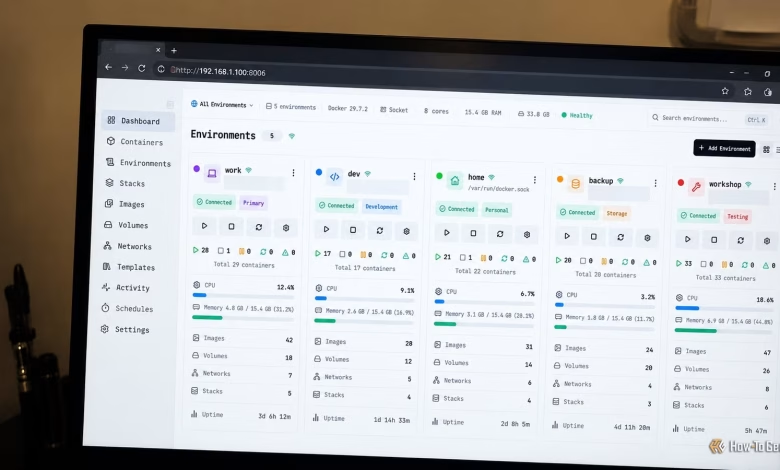
Like many home lab users, I initially utilized Portainer for managing Docker containers via a web browser. Portainer simplifies Docker management, reducing the need to constantly use the command line. However, as the number of applications I managed increased, I added more specialized tools. Dockhand integrates many of these functions into one platform. Its container view provides insights into running services and their resource consumption, while the Compose management interface allows interaction with application definitions and stack deployments.
The ability to work with Compose files is particularly advantageous in a home lab. You can store application configurations in a file and make updates as needed, redeploying the stack without having to switch to a different management interface. Dockhand also allows for Git-based deployments, which is beneficial if your configuration files are stored in a repository.
Dockhand supports multiple Docker environments, allowing management of containers across various hosts like a home server, NAS, or another Linux machine. Instead of juggling separate dashboards for each host, I can consolidate my environments under one roof.
Fewer Tools Needed for Image Update Management
Image Update Management with Dockhand
Tools like Watchtower and Dockpeek handle vital aspects of Docker maintenance, such as tracking changes in container images to manage updates effectively. Watchtower automates this process, while Dockpeek helps identify updates available for containers.
Dockhand incorporates capabilities for checking and scheduling image updates. It can identify containers ready for updates and allows me to decide how to proceed. I can set up scheduled checks and automatic updates for entire environments or individual containers, catering to my specific workflow.
This feature gives me greater control over the updating process from the same interface I use for application management. I can assess pending updates, inspect the corresponding containers, and handle deployment without having to resort to another dashboard. Additionally, Dockhand’s vulnerability scanning integrations add another layer of utility by evaluating images against vulnerability criteria during updates. This provides essential information for maintaining a set of self-hosted applications.
Inspecting Container Logs Made Easy
Troubleshooting Services Within a Single Dashboard
Dozzle is a popular tool for inspecting Docker logs via a web browser, simplifying troubleshooting without needing to shift to the terminal. Dockhand also features a log streaming function integrated into its management interface, enabling users to inspect container outputs and access interactive shells for deeper investigation. This unification of container management and logs minimizes the need to switch between applications during routine checks.
This setup proves particularly useful when several services depend on one another. For instance, a failed database connection may disrupt an application relying on that database. Having the ability to examine related containers from a single interface greatly aids in troubleshooting issues.
While Dozzle remains a solid option for those requiring a focused log viewer, Dockhand aligns better with my needs, allowing for efficient log inspection alongside broader container management tasks.
Enhanced Container Monitoring
What Dockhand Can Replace from Monitoring Tools
Container-mon offers a way to monitor running services, but Dockhand already provides container status and resource usage information. Thus, it fulfills much of my basic monitoring needs while managing Docker.
However, I continue to use Uptime Kuma for comprehensive health checks as merely having a running container does not guarantee the application inside is functioning correctly. A web server might appear active, while its application could be returning errors. Thus, I find Dockhand to be an adequate replacement for the visibility features I require from container-mon, while I conduct uptime checks independently.
Dockhand Simplifies My Home Lab Management
By consolidating five separate containers into a single management application, Dockhand not only minimizes the footprint of my home lab but also reduces the complexity of interfaces and workflows. For any home lab centered on Docker Compose, Dockhand is certainly worth exploring, as it merges several routine tasks into one interface.