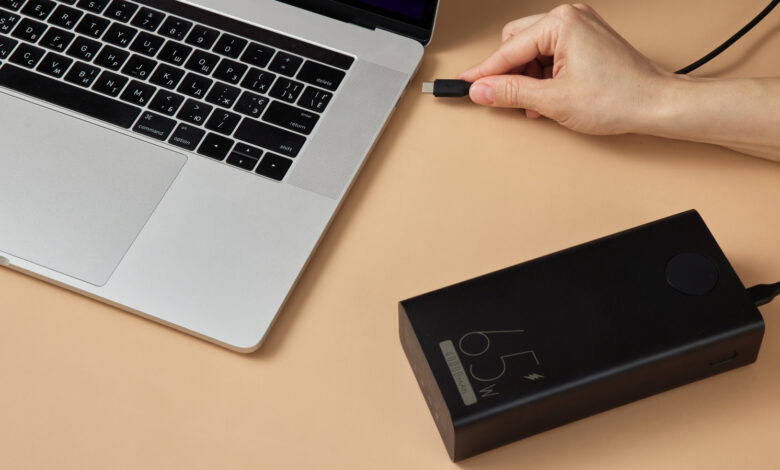
Understanding power banks: it’s more about watt-hours than just milliamp-hours.
While many power banks claim to extend your laptop’s usage, true laptop power banks need to store substantial energy and deliver it more rapidly than your laptop consumes. Two key figures define the capability: watt-hours (Wh) for capacity and watts (W) for output. Typically, power banks list capacities in milliamp-hours (mAh); however, for an accurate comparison across various devices—especially power-hungry laptops—you should convert this measurement to watt-hours by multiplying the mAh value by the voltage.
Most power banks utilize lithium-ion batteries, which generally operate at approximately 3.7 volts (V). The formula to calculate watts is volts multiplied by amperes, and it’s important to convert mAh to amps by dividing by 1,000. For instance, a 10,000 mAh bank equates to roughly 37Wh (using the formula 3.7V x 10Ah) before accounting for any energy loss during conversion. So, a bank with 20,000 mAh would provide about 74Wh under similar conditions.
Next, find your laptop’s battery capacity in watt-hours, typically available from the manufacturer’s website. Estimating power consumption can be tricky without a wattmeter, but you can gauge it by dividing the Wh capacity by the number of hours of usage. For example, a 70Wh battery lasting 5 hours equates to an average consumption of 14W. Keep in mind, actual power usage varies based on tasks (viewing a PDF generally consumes less energy than video rendering).
For instance, modern MacBooks have batteries ranging from about 37Wh (MacBook Air) to 100Wh (16-inch MacBook Pro). This means using a 10,000 mAh (37Wh) power bank often won’t fully recharge your MacBook.
Assessing Your Power Bank’s Capabilities
When estimating how long a power bank can power your laptop, remember that the charging process may not be fully efficient. Fast charging methods like USB Power Delivery require the bank to increase its voltage, which might result in some energy loss. Generally, an efficiency loss of around 20% is common for regular charging, but with fast charging, this can jump to 30% or more.
Using all this information, you can get a rough idea of how long a power bank will keep your laptop running. For example, connecting a 20,000 mAh 45W USB-C bank to a laptop with an average usage of 14W, after accounting for a 30% efficiency loss, provides about 52Wh of usable energy, allowing for roughly 3.7 hours of additional runtime. If the laptop tries to draw more power than the 45W the bank can deliver, it will pull from its internal battery to maintain operation.
The key takeaway is that the capacity of a power bank doesn’t directly translate to its output. A power bank with 50,000 mAh capacity is excellent, but its actual power output is crucial. Look for the “USB-C PD” label, indicating compatibility with higher charging standards. This ensures that both the bank and laptop can negotiate for optimal power levels, surpassing what a standard USB port can achieve.
Furthermore, verify the power bank’s output per port. A total output of 100W might sound impressive but may not be available on all ports simultaneously or could be lower when multiple devices are charged simultaneously.
For most users, a power bank around 20,000 mAh/74Wh serves as a solid backup or partial charging solution, while a 27,000 mAh/100Wh option is preferable. In the US, power banks exceeding 100Wh require special approvals for air travel. Recommendations for suitable laptop power banks cover various needs.
Troubleshooting Charging Issues
Just like using a car’s USB port, a low-capacity power bank may provide some power to your laptop, but it may not keep pace with the battery’s depletion during usage. Other factors to examine include whether your laptop supports charging via USB-C, as some ports are designated only for data and not charging. If there are no markings on the port, consult the manual or product specifications online.
Next, confirm that the power bank supports USB-C Power Delivery at a sufficient wattage. A basic 15W output may work for phones but won’t suffice for laptops that need 65W or more. If the bank’s output falls short of the laptop’s requirements, it will either charge very slowly or not at all under standard usage conditions.
Finally, inspect the charging cable, as not all USB-C cables can handle high-wattage outputs. Regular USB-C cables generally support up to 3 amps, while high-power setups need cables rated for 5 amps or above. USB PD 3.1 can handle up to 240W, but this requires all parts—the laptop, bank, and cable—to be compatible.
Provided your USB-C PD hardware is compliant, devices can negotiate for an appropriate voltage and current. Avoid using damaged or outdated cables, as these cannot meet the demands of modern power requirements.