Unveiling the GoPro Wireless Microphone System: A Sound Enhancement with Room for Improvement

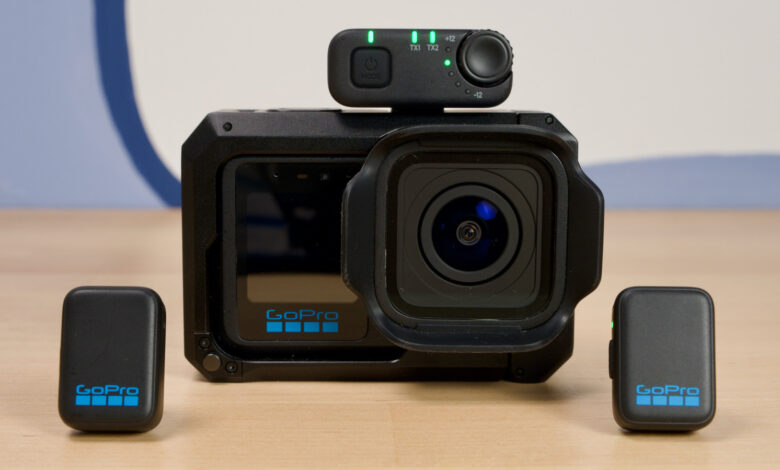
The new Wireless Mic System, though made by GoPro, is versatile enough to be used with various devices beyond just action cameras. A standout feature is its ability to connect directly to GoPro cameras, starting with the Hero 12, which allowed users to pair Bluetooth microphones directly. Up until this release, alternatives like DJI’s Mic Mini and Mic 3 were among the top choices for direct Bluetooth connectivity due to their combination of Bluetooth and a physical receiver.
Connecting the Wireless Mic System to your device is straightforward: simply power on one of the microphones and press the power button three times to activate Bluetooth mode. After turning the mic off and back on while holding the button, the camera will recognize it, and you’re ready to go. You can connect either microphone, but only one can be active at a time. Pressing the mic button once will activate noise reduction, indicated by a white LED light.
To use the receivers, connect them to the camera or PC using USB or 3.5mm, depending on the device. If the last connection was via Bluetooth, a quick three taps on the power button will switch it back to receiver mode.
While its ability to connect without needing a receiver is a significant advantage, using the hardware receiver provides better audio quality and allows both microphones to be used simultaneously. The USB receiver fits snugly into the recessed USB port of a GoPro, eliminating the need to remove the protective door entirely, although you can do so for a cleaner look. When using the kit with a smartphone, the dongle extends slightly from the phone, but it remains snug and secure.
When using both microphones with the USB receiver, I noticed that the GoPro display only shows one VU meter, which might lead users to think that only one microphone is connected. However, upon reviewing the footage, both microphones are recorded successfully.
In this setup, audio is captured in “split” mode, with one microphone channeling to the left side and the other to the right. This can be disorienting during playback on headphones or speakers. The TRS receiver allows switching between mono and stereo, but currently, there’s no option to do this with the USB receiver. As a result, users may need to convert the audio to mono during editing, making it more cumbersome if they want to share a clip directly from their phone or computer.
If you’re using a smartphone, apps like Blackmagic Camera can mitigate this issue by merging both audio channels. However, most default camera apps lack this feature, adding to the inconvenience. Fortunately, this could potentially be remedied through a future firmware update. GoPro has two applications—Quick and Fluid—that may eventually allow for USB dongle settings adjustments, but until then, users will have to rely on alternate solutions.
Additionally, there’s currently no way to start or stop recording on a GoPro with its own microphones, a feature that is available with DJI products and one that I often find essential when using Osmo cameras. While it may be a minor detail, it appears to be an overlooked opportunity.