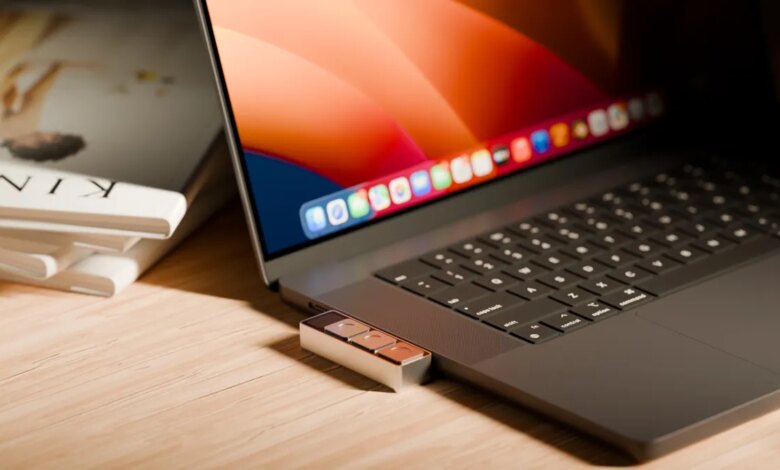
One major frustration with various meeting applications is the inconsistent shortcuts for muting audio or disabling the camera. Remembering the correct keys can be challenging during important discussions. This led to the creation of Dune by Project Mirage, a compact aluminum keypad featuring three keys, designed to connect directly to the USB-C port of a MacBook.
Priced at $119, Dune adapts its functions according to the application in use. For example, in video conferencing tools, it allows users to toggle the microphone, turn off the camera, or bring a window to the foreground. In spreadsheet software, the buttons can execute commands like copy, paste, and undo, while in web browsers, they can refresh pages, open the URL bar, and paste text. Additionally, developers can utilize it for tasks in coding platforms like VS Code or GitHub, such as merging or accepting pull requests.
The device is tailored to fit specific Mac models snugly, eliminating any gaps when connected. If the USB ports are occupied, users can connect it via a dongle, as it does not require a battery or separate charger, drawing power from the MacBook itself.
Currently, Dune is compatible with MacBook models equipped with M2 Air or newer, as well as M1 Pro or later, running macOS 15 Sequoia or later versions.
While the design of Dune is appealing, it was noted that the keys required more pressure to activate. In some instances, accidental presses led to the unintentional activation of the microphone or disabling of the camera. This unintended engagement raises concerns about the button sensitivity.
Dune includes an accompanying app that facilitates the configuration of shortcuts, whether for specific applications or system-wide. Users can assign Dune buttons to keyboard shortcuts, commands, or links to apps and websites.
Additionally, the app integrates with your calendar, showing upcoming meetings a few minutes prior, allowing you to join, dismiss, or send a “running late” message easily.
For those interested in customizing further, there’s an option to write and execute Python scripts. Non-coders can make use of Claude Desktop, explaining the desired shortcut in simple terms, with the AI handling the coding and key assignment automatically.
I created a shortcut that, while on a startup’s website, provides a brief overview of the company, including competitors and investors, along with potential questions for meetings. This feature is beneficial for anyone needing to evaluate companies quickly. Another shortcut I designed quickly converts images to JPG format for easy uploads to platforms like WordPress or social media. Both shortcuts were user-friendly to create, although some adjustments were necessary once implemented.
The app also offers a marketplace, showcasing features developed by other Dune users. If the marketplace gains traction, it could become integral to Dune’s expansion, fostering a community around hardware-supported automation and skills.
However, currently, the skills available are limited, and users cannot test them without assigning them to a button. It would be advantageous for the app to allow skill previews prior to assignment. The startup also needs to enhance its library of suggested skills for various applications.
Once the introductory offer ends, Dune will be priced at $149, making it a worthwhile investment for productivity enthusiasts. While alternatives like MuteMe focus on simple mute functionality and Stream Deck provides business-oriented macros, Dune stands out for its customization capabilities across both hardware and software.