Unlocking the iPhone Duo: Innovative Apps That Highlight Its Full Potential

There’s a renewed excitement surrounding the launch of a new iPhone.
For years, the introduction of a new iPhone typically revolved around enhancements such as a sleeker design, improved speed, and impressive camera features. However, there came a time when these upgrades felt merely incremental. Each new model brought minor adjustments rather than groundbreaking changes, and the device itself continued to resemble the familiar rectangular, glass-and-metal structure.
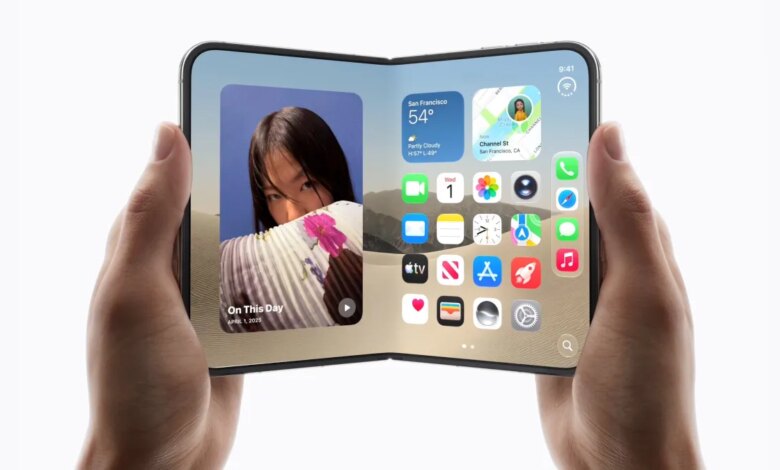
The introduction of the iPhone Duo marks a departure from this trend, as Apple ventures into the realm of foldable smartphones. This innovative phone, albeit imperfect, brings a sense of whimsy and genuine excitement to the user experience.
Initially, I wasn’t convinced about the iPhone Duo’s appeal; the official launch left me questioning its practicality. Would a foldable phone truly enhance my experience? The starting price of $2,000 only added to my hesitation.
However, as I observed developers creating apps specifically designed for this new foldable format, my interest began to grow. The vibrancy and creativity within Apple’s software development community are significant reasons many of us remain loyal to the brand, with developers often prioritizing iOS. This is vital for those who enjoy early access to unique features.
At launch, reviewers noted the shortcomings: many standard iOS apps were unoptimized for the Duo. This meant encountering black bars, awkward control placements, or having to zoom in, reminiscent of the early days of using iPhone apps on an iPad.
Nevertheless, the apps specifically tailored for the Duo piqued my curiosity. Suddenly, my inbox was filled with notifications for clever applications that I could only explore if I acquired a Duo. The fear of missing out was real.
The most compelling of these apps not only adapted to the two different screen sizes but also ingeniously utilized these display variations in their design. Here are some early favorites that I experienced on a review unit provided by Apple:
Netflix
Netflix is one of Apple’s selected partners for the Duo’s launch, having optimized its streaming app for the device. Given the current trends in media consumption, the Duo provides an excellent platform for watching movies and shows.
Rather than simply scaling up to fit the new screen, Netflix strategically utilizes the differences between the two displays: the outer screen allows users to browse short video clips, while the larger inner screen is perfect for immersive viewing. Transitioning between the two feels as seamless as opening the Duo itself.
As someone who often watches content on my phone rather than a television, having the ability to switch between screen sizes within one device is particularly appealing, making Netflix likely one of my most frequently used apps.
Deck-Man (Previously Duo-Man)
Originally, I predicted that Deck-Man, a music app formerly known as Duo-Man, would spark my interest in the Duo. Created by independent developer Vidit Bhargava during a hackathon, this app cleverly replicates the functionality of a cassette player using the Duo’s dual screens.
The app gives a nostalgic digital twist to the cassette experience, allowing users to scroll through album covers and control playback just as they would on a traditional player. The sounds of genuine clicks and cassette mechanisms add to the retro ambiance.
When the Duo is open, the cassette player interface occupies one side, while album graphics are displayed on the other. When closed, its design mimics a real Walkman.
The appeal lies not only in its unique functionality on a foldable device but also in its connection to a nostalgic era. In a world filled with rapid technological advancements, this retro homage stands out.
TypeDraw
Much like a virtual notebook, TypeDraw offers users a charming interface reminiscent of a Moleskine. The Duo’s form factor adds to this effect, especially when closed.
Within TypeDraw, users can write using a handwritten font or select from several styles crafted by its designer, Phil Traut. The app offers various types of paper—lined, grid, or dotted—and allows users to incorporate illustrations alongside their handwritten notes, transforming it into a delightful journaling experience.
Turning the pages feels dynamic, and the added feature of an elastic band that produces a playful twang enhances the app’s charm.
Wakeout
Wakeout, a winner of the Apple App of the Year award, has effectively adapted its workout app for the Duo by creating varied interfaces for different configurations of the device. The app features fun mini exercises that feel more like games, whether the Duo is closed, opened like a book, or set up like a laptop.
In book mode, users can view workout videos on one side, while in laptop mode, the layout shifts to accommodate the vertical display. The tent mode is particularly useful for following along while placed on a desk.
Flighty
Flighty, recognized for its comprehensive flight tracking features, capitalizes on the Duo’s expansive screen. When opened, the app showcases an interactive globe, letting users explore their flight paths with more detail.
Flight details are neatly organized on the left, while the right side displays the globe. This design allows for multitasking, enabling users to check flight updates while enjoying other activities.
A new “En Route Mode” enables Duo users to enjoy updates about their flight while using the device in tent mode during flights, allowing for seamless multitasking.
Tiny Computers
Tiny Computers is a playful application designed for enthusiasts of nostalgic technology. This app offers experiences with ten retro computers, allowing users to engage with classic operating systems and interfaces in a fun way.
In its open mode, the Duo serves as a virtual playground for exploring these old devices, where users can discover hidden features and gain rewards without any added costs beyond the initial purchase of the app.
Sky Guide
Sky Guide is a tried-and-true stargazing app, which shines on the Duo’s larger display. The ability to track celestial bodies becomes far more immersive with the expanded screen real estate, making it an excellent companion for outdoor adventures.
MD Vinyl
As a fan of retro music applications, MD Vinyl’s enhancement for the Duo impressed me. The app, which already had a place on my home screen, takes full advantage of the Duo’s display, allowing users to simulate putting a record on and off to control playback.
Pico Cam
Previously a playful mini camera app, Pico Cam has been optimized for the Duo, offering a fun experience for capturing Polaroid-style photos. The larger display allows users to manage their gallery more easily.
Honorable Mention: Toastie
Toastie provides a lighthearted experience similar to an earlier app that simulated drinking a beer. While it may not be essential, it’s an amusing addition for those who appreciate quirky apps, challenging users to time their cooking just right.
As developers get accustomed to the iPhone Duo’s capabilities, we can expect an influx of creative apps in the near future.