I Tested Google Wallet’s Latest Order Tracking Feature, and the Results Were Impressive!

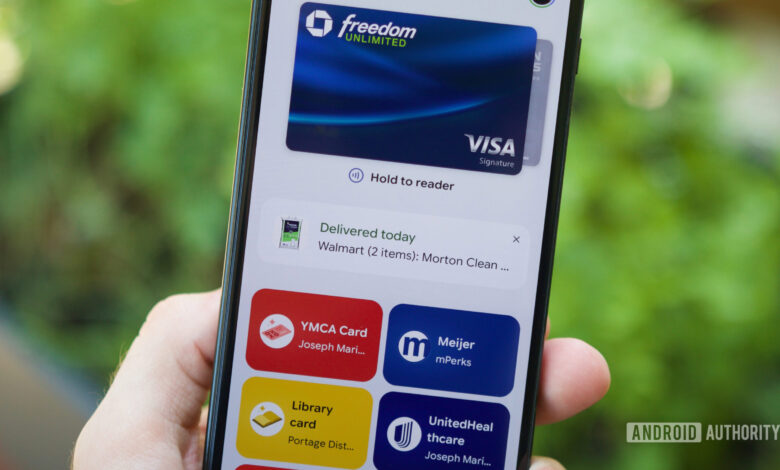
Google has quietly introduced an order tracking feature in its Wallet app, and initially, I didn’t see it as a significant addition. However, after using it for a few days, I’ve become a fan.
Is Order Tracking a Feature You Want in Google Wallet?
1 vote
Order Tracking: The Unexpected Feature I Needed
With countless applications available for tracking online purchases on Android in 2026, you’d think I would be satisfied with them. The Google Play Store is filled with dedicated tracking apps, and Google has already integrated order info into the Gmail app.
While that’s useful, I prefer not to clutter my phone with extra apps. I also wish to minimize my time spent checking emails and have reservations about trusting Gemini with order details.
The order tracking feature in Google Wallet retrieves data from my Gmail, so it’s similar to the existing order info available in Gmail. However, having it integrated into the Wallet app feels much more coherent.
Users can access order tracking on the home screen via pop-up notifications or through the main transactions page. I was first alerted to this feature when a pop-up notification informed me that my Walmart order had been delivered. Clicking the pop-up provided additional details about the order, which I could easily dismiss with an X. It’s straightforward and effective.
If you want to delve deeper into your orders, you can press the “View more” button at the bottom of the Wallet app. The Transactions section now features a carousel that showcases your recent orders. By swiping left, you can tap on “All orders” to see a complete history of your purchases.
Currently, the order tracking system functions smoothly. It automatically displays orders from various retailers, including Amazon and Converse, and even includes pickup orders from Meijer. If an order-related email lands in your Gmail, it appears in Wallet effortlessly.
All this information is neatly organized on the new “Transactions” page, where you can filter to view either online orders, Google Pay transactions, or both. As someone who manually logs purchases for budgeting, this sequential list of orders—both online and in-person—is immensely helpful.
Google Wallet is Enhancing Its Functionality
Although Google Wallet might not be the most glamorous app, it is undoubtedly essential, and I frequently use it throughout the week. The payment and pass functionalities are practically perfected, so it’s refreshing to see order tracking and other practical features added.
There are some imperfections, such as the app sometimes showing orders that are marked “Ready for pickup” even when they’ve been picked up for days. Implementing a feature to mark orders as completed would be advantageous, and the option to pin vital orders to the homepage would enhance user experience—especially for high-priority orders.
Overall, I appreciate Google exploring innovative enhancements like order tracking. I hope this trend continues, as it enriches the Wallet experience with genuinely useful features.
Thank you for being part of our community. Please make sure to review our Comment Policy before posting.




