The software experience is often touted as a premier feature of Google Pixel smartphones. Google’s philosophy focuses on delivering a streamlined interface, a selection of genuinely beneficial features, and minimal extraneous elements.
The encouraging news is that you don’t have to own a Pixel device to partake in the unique benefits it offers. With a few free applications, you can mimic much of the Pixel experience on nearly any Android phone. Here’s a breakdown of how to do just that.
Lawnchair: The Ultimate Pixel-Like Launcher
A Key Interface for Transformation
If you need a single application that can significantly alter your phone’s appearance to resemble a Pixel, Lawnchair is your best bet.
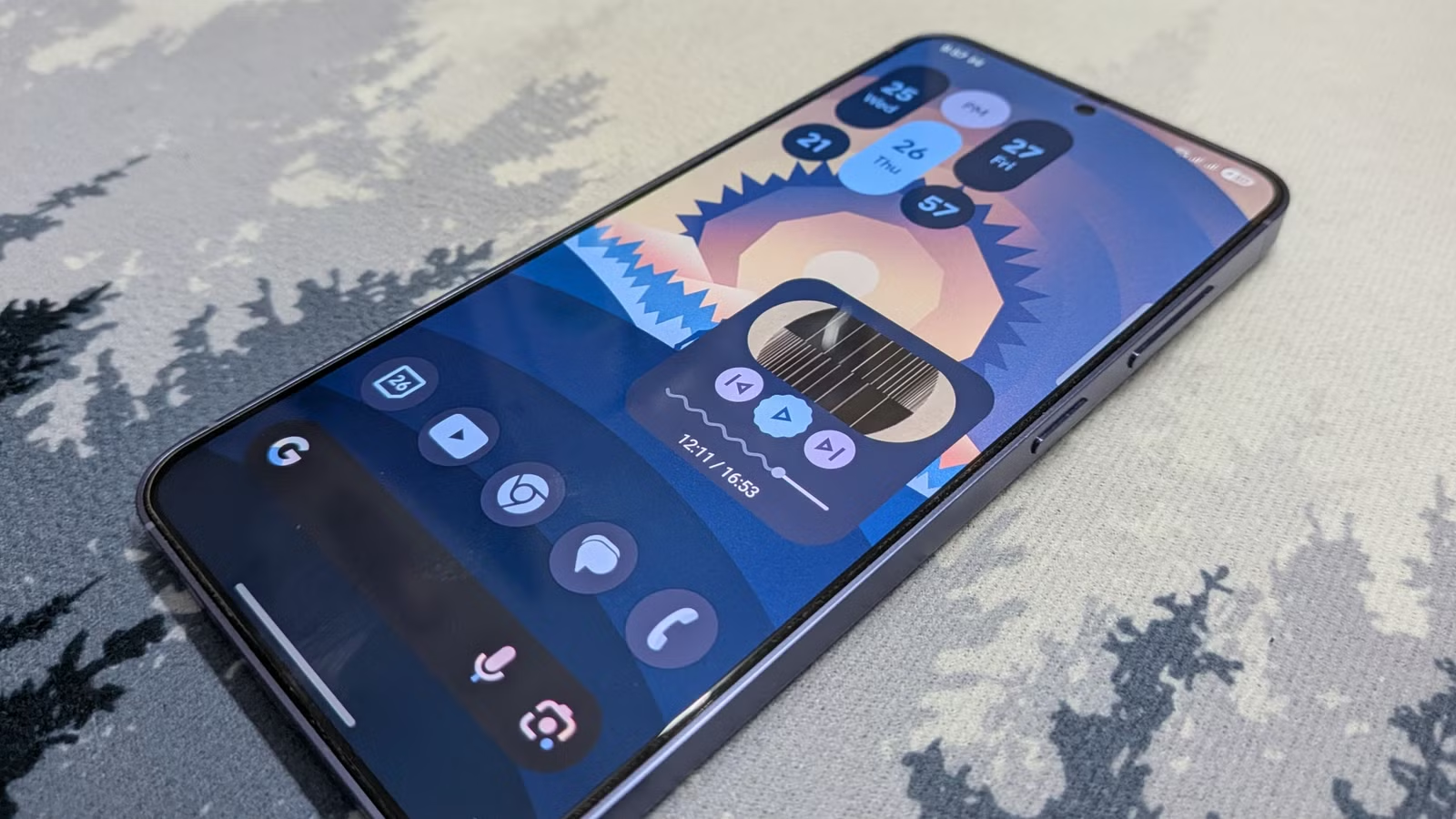
This impressive launcher aims to replicate the aesthetics of the Pixel’s default launcher while offering enhanced customization capabilities.
Similar to the Pixel’s own software, Lawnchair utilizes Material You design, which adapts your entire system’s color scheme based on your wallpaper. For optimal results, it’s recommended to use one of the stock Pixel wallpapers along with Lawnchair.
The launcher includes a persistent Google search bar at the bottom and features an “At a Glance” widget at the top, providing real-time updates on the time, date, weather, calendar schedules, and more.
Lawnchair’s “At a Glance” feature is proficient if you’re seeking a pure Pixel-like experience without requiring extensive system permissions. However, for users wanting more customization, the Smartspacer app offers additional capabilities.
With over 500,000 downloads on the Play Store, Lawnchair has proven popular despite being in beta. Visually, it provides one of the closest experiences to a Pixel without needing any device rooting or custom ROM installation.
Lawnicons: Bringing an Aesthetic Touch
Unified Visual Style for Your App Grid
While Lawnchair is robust, it isn’t without its limitations—specifically regarding icons. While it allows custom icons, it lacks pre-installed packs that embody the Material You theme. Thus, the only icons that align with the Pixel style are Google’s own.
To overcome this aesthetic gap, the creators of Lawnchair have introduced the Lawnicons pack, which features monochromatic vector designs for most popular apps, including Reddit, Discord, and LinkedIn.
Additionally, Lawnicons can automatically adjust to dark mode and your wallpaper’s accent colors, making it essential for achieving a cohesive Pixel-like appearance.
Google’s Core Apps: Phone, Messages, and Gboard
Your Essential Daily Tools
Most Android manufacturers utilize Google’s superior suite of apps: Phone, Google Messages for SMS/MMS, and Gboard. These apps are known for their intuitive design and integration of Material Design, which are hallmarks of the Pixel experience.
If your device already uses these Google services, there’s no need for installation. However, many brands, especially Samsung, provide their proprietary alternatives. Samsung is transitioning from its messaging app to Google Messages, indicating a broader shift in the messaging space.
To complete your Pixel transformation, consider replacing other core apps like the dialer and keyboard with Google’s offerings.
Sideload Gcam for a Pixel-Like Camera Experience
Utilizing Advanced Computational Photography
Pixel smartphones are renowned for their exceptional camera capabilities. However, the real magic lies in the software and post-processing applied to each photograph.
You can capture this exclusive Pixel look by using Google’s camera app, often referred to as GCam. Unfortunately, it’s not available for direct download from the Play Store and requires sideloading through trusted sources.
As GCam is tailored for Pixel hardware, it may necessitate a device-specific XML file for optimal performance. Some GCam versions may already have profiles configured for different phone models, but proceed with caution when downloading APKs to ensure safety.
Note that secondary lenses, like telephoto and ultrawide, may not function as intended with the GCam app on non-Pixel devices.
Accessing the Exclusive Weather Interface
Among numerous weather applications, Pixel’s is highly regarded for its aesthetic and practical functionality. It’s user-friendly and attractive, making it a daily go-to.
The Pixel Weather app features substantial font displays and alert notifications for weather updates, alongside simple, charming forecast icons. Essential information, like the UV index and humidity levels, are also included without any intrusive ads.
Though Google makes it difficult to install the app on non-Pixel devices, acquiring the correct version of the APK is typically easier than doing so for GCam.
Opt for Google’s App Suite for a More Pixel-Esque Experience
Finalizing Your Transformation
After setting up the launcher, icons, core applications, camera, and weather app, the next step is to integrate additional Google apps that can replace your phone’s native versions. Many Android brands already utilize Google applications, but Samsung, in particular, has a significant number of its proprietary apps that could benefit from Google alternatives.
Consider swapping out core functionalities like Clock, Calendar, Keep, and more, which all align with Google’s Material You design philosophy.
Experience Pixel Features on Any Device
If you’ve always admired the vibrant yet clean aesthetic of Pixel phones but aren’t convinced by their hardware, plenty of available applications can help you simulate that experience. This list presents the primary tools you can utilize, and there are even more advanced tweaks to explore to make your device feel nearly indistinguishable from a Pixel—start diving into community resources for added modifications.