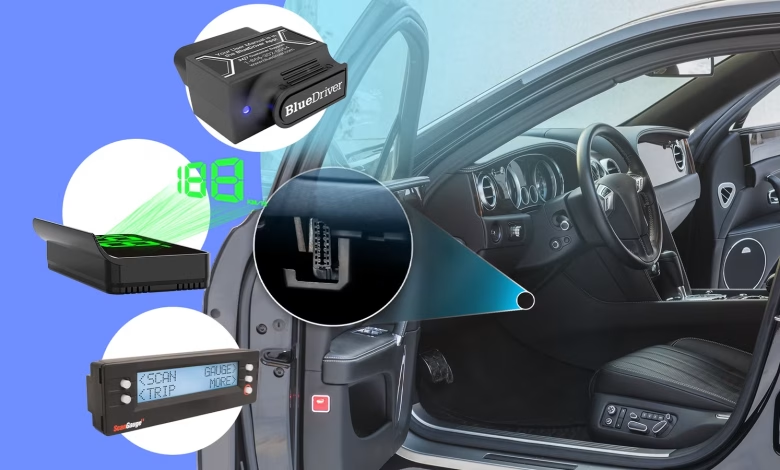
Have you ever noticed the array of wires and connectors beneath your car’s steering wheel? Among them, there’s a unique 16-pin connector known as the OBD-II port. This is the same port that automotive technicians utilize during emissions tests and when diagnosing error codes related to the check engine light. However, its functionality extends way beyond that. You can connect various gadgets, both practical and quirky, through this port.
Understanding the OBD-II Port
The Dedicated Diagnostic Connector
The OBD-II (On-Board Diagnostics II) port is a standardized rectangular connection found in most contemporary vehicles. This system came into effect after 1996 to replace the older OBD standard. What exactly is its purpose?
The OBD-II port serves as a conduit for diagnostic equipment to interface with the vehicle’s onboard computer. This is the primary method for mechanics to retrieve error codes, clear the check engine light, and access diagnostic trouble codes (DTCs). Furthermore, it provides real-time data on various vehicle systems, including emissions and engine performance. Essentially, it’s the entry point to a vehicle’s computer.
For instance, when an issue arises, the car lights up the check engine warning on the dashboard and logs a DTC in its computer. Mechanics can subsequently use diagnostic tools to read these codes, aiding in the identification and resolution of issues.
Primarily meant for diagnostics, the OBD-II port can also power a plethora of devices. Many people are only familiar with this port when a technician connects it to their car for emissions testing. Here are some fascinating uses for this port.
OBD-II Scanners and Fault Code Readers
A Must-Have for All Vehicle Owners
If you enjoy doing things yourself, affordable tools like the MOTOPOWER scanner make it easy to utilize the OBD-II port. Whenever the check engine light appears, you can diagnose the issue before taking your vehicle in for service. Plus, you can look up the trouble code and attempt to fix the issue independently, saving on mechanic fees.
Typically, users opt for OBD-II code scanners, which can range from inexpensive basic devices to high-end professional versions costing several hundred dollars. A good entry-level option is advisable.
GPS Trackers
Discreet Vehicle Tracking
Another popular application of the OBD-II port is for GPS tracking. This can be especially helpful for parents keeping tabs on their children’s driving or for car enthusiasts wanting to monitor stolen vehicles. Additionally, many companies use GPS trackers in their fleet vehicles.
Some insurance companies offer discounts for safe driving, which can be tracked using devices connected to the OBD-II port. These devices typically monitor speed and driving behavior to determine eligibility for discounts.
Wi-Fi or Bluetooth OBD-II Scanners
Monitor Your Vehicle from Your Smartphone
While traditional scanners are effective, modern technology offers solutions that are often more convenient. For instance, the BlueDriver OBD-II scanner connects with smartphones via Bluetooth or Wi-Fi, allowing users to access vehicle data directly from their devices.
This dongle provides all the functional capabilities of larger scanners, including diagnostic checks, code clearing, and real-time performance monitoring. Although there are several cheaper alternatives available, the BlueDriver is a recommended choice for those looking to DIY vehicle maintenance.
Enhancing Your Drive with a HUD or Smart Gauges
Upgrade Your Vehicle Experience
Have you noticed that some newer or high-end vehicles include heads-up displays (HUDs) that show critical information right in the driver’s line of sight? If you have an older car, you can still enjoy this feature by using OBD-II powered HUDs available on the market. These devices can display speed, engine temperature, and much more directly on your dashboard or windshield.
ScanGauge for Monitoring Systems
Track Vehicle Metrics Effortlessly
If you prefer a more subtle monitoring option than a HUD, consider the ScanGauge. This popular tool allows real-time viewing of vital vehicle data such as fuel efficiency, trip information, and diagnostic trouble codes, making it particularly popular among off-road enthusiasts.
Powering Your Devices via the OBD-II Port
Utilize the Port for Additional Power Sources
Another advantage of the OBD-II port is its ability to serve as a power supply. Many users have discovered that they can use this port to power devices like dash cameras, radar detectors, and mirrors without occupying other electrical outlets in their vehicle. By using an OBD-II to USB adapter, for example, you can free up your 12V port for other uses.
Using an OBD-II Splitter
Expand Your Connectivity Options
Considering the many devices you might want to connect, an OBD-II splitter can be incredibly useful. With a splitter, you can use multiple devices simultaneously, such as a ScanGauge to monitor performance while powering another device, enhancing your driving experience.
OBD-II Anti-Theft Lock
Improve Vehicle Security
As a final note, an OBD-II anti-theft lock may also be worth considering. With increasing concerns about vehicle theft using the OBD-II port, this security accessory can add a layer of protection. While it may not deter every thief, it can make unauthorized access more challenging.
Leverage Your OBD-II Port
Your vehicle is equipped with an OBD-II port that can do more than you might realize. Whether you’re looking to power devices, collect diagnostic data, or troubleshoot issues independently, this port is an invaluable resource. If you’re a hands-on vehicle owner, the tools and accessories mentioned can significantly enhance your automotive experience.