Opt for a basic gaming PC instead.
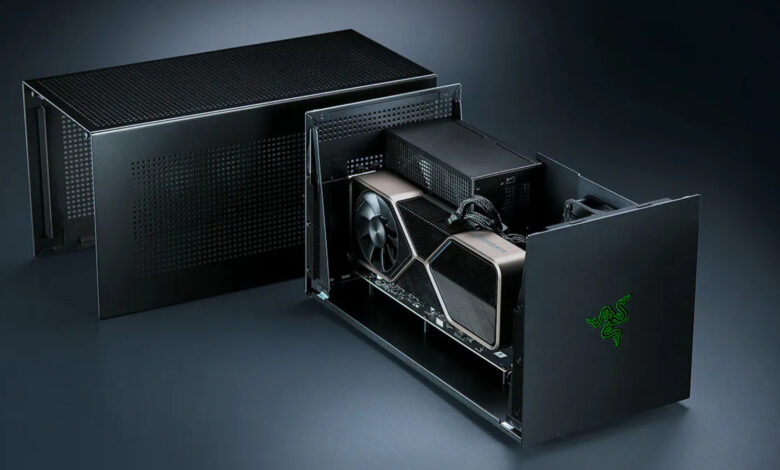
If you’re seeking to enhance your laptop’s gaming capabilities without shelling out for a new device amid soaring RAM prices, an external graphics processing unit (eGPU) could be a viable option. An eGPU typically consists of a desktop graphics card housed in an enclosure that connects to a laptop or gaming handheld via Thunderbolt or USB4. This setup can significantly improve performance, enabling even less powerful machines to run demanding games. However, several limitations exist.
The performance of a GPU connected as an eGPU often falls short when using Thunderbolt, compared to its performance inside a desktop system. Furthermore, the cost of the enclosure alone can reach several hundred dollars, and certain models, such as those featuring Apple Silicon, are not compatible for gaming at all. Nevertheless, the eGPU market is improving, with Razer reintroducing its eGPU line with a Thunderbolt 5 dock in mid-2025, and Framework developing an eGPU kit for its Laptop 16.
Performance Limitations of eGPUs
A Thunderbolt 4 port supports a bandwidth of 40Gbps, but only allocates 32Gbps for PCIe data, significantly less than the 256Gbps available in a desktop PCIe 4.0 x16 slot. Most of the processes handled by the GPU in an eGPU configuration will not pass through the Thunderbolt connection. Textures and shaders are loaded into VRAM where they remain until needed, meaning the Thunderbolt cable is primarily tasked with transferring new assets or sending completed frames back to the display.
A review conducted by Notebookcheck in 2021 found that an RTX 2080 Ti in an eGPU setup underperformed compared to a desktop variant by 7 to 32 percent. While the performance gap narrowed under 4K resolution on external monitors, rendering to a laptop remains slower due to the return trip of completed frames through the same cable. Another study by PC Gamer with RTX 4070 Ti and 4090 models highlighted a 25 percent slowdown over Thunderbolt compared to OCuLink in multiple 1440p tests, also experiencing lower frame rates and increased stutter.
The upgrade from a 4070 Ti to a 4090 demonstrated diminishing returns over Thunderbolt and OCuLink, indicating that higher-end GPUs face greater performance limitations through the Thunderbolt connection. As such, selecting a mid-range GPU for an eGPU setup might be more pragmatic. Thunderbolt 5 offers 80Gbps of bandwidth, while Razer’s $350 Core X V2 utilizes PCIe 4.0 x4, effectively limiting an x16 graphics card to just four lanes as opposed to the 16 available in a desktop configuration.
Price and Compatibility Considerations
The Core X V2 enclosure comes alone, requiring additional components like an ATX power supply and USB ports, which Razer sells separately as a Thunderbolt 5 dock starting at $390. Once you factor in the cost of a graphics card, pursuing this setup may feel less appealing compared to simply investing in an affordable gaming PC that circumvents the bandwidth constraints of external connections. Furthermore, Thunderbolt 5 laptops are limited, predominantly found in premium gaming laptops and high-end workstations; thus, using a Thunderbolt 4 laptop with the enclosure restricts performance to 40Gbps.
OCuLink provides an alternative that bypasses Thunderbolt by supporting PCIe directly over a cable. Framework’s OCuLink Dev Kit exposes an eight-lane PCIe connection on the Laptop 16, allowing for speeds of up to 128 Gbps. This route sacrifices some convenience, as OCuLink does not power the host and lacks the plug-and-play functionality that makes Thunderbolt solutions more user-friendly.
Apple discontinued eGPU support following its transition from Intel to its own silicon back in 2020, and no updates to macOS since have reintroduced it for graphics processing. However, the company did approve TinyGPU earlier this year, a driver extension that enables certain newer AMD and Nvidia cards to work over Thunderbolt or USB4, but it is limited to AI workloads and lacks display output, making it unsuitable for gaming.